Showing posts with label BOOK CLUB. Show all posts

Tuesday, February 7, 2012

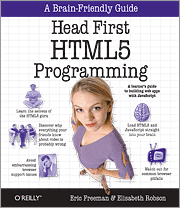
Book Review: Head First HTML5 Programming


It’s a good bet that at some point your everyday tester is going to need to come face to face with the newest web standards, and if you have to get exposed to it from a books viewpoint, well, this is a friendly and straightforward way to do it. Head First HTML5 Programming uses a fun and graphically dense format to help get people comfortable with the ideas of using HTML5, CSS3 and Javascript.

OK, first and foremost, this is not an absolute beginner’s book, although you may well find that you don’t need all that much underlying understanding to be effective. If you have a basic understanding of HTML tags understand some CSS formatting and have seen and can recognize XHTML or XML, then you know enough to work through this book. This is also not a grans master’s book, either. It is not a comprehensive reference. What it does do is provide a basic framework and some fun text to help the user get familiar with HTML5 syntax and use JavaScript to help create web applications.

The book starts out with some basics, showing you how HTML5 is utilizing the standards of HTML, CSS and JavaScript as defaults, and the fact that many of the strict type details that were part of HTML 4.01 and XHTML are integrated.  Games such as crossword puzzles, word matches, sample programs and workbook projects are included to help get the gist of how to use recognize the changes and see them in action. Interviews with HTML5 and JavaScript are also included (no, I didn’t just make that up :) ).

The book then moves into JavaScript and explains the way JavaScript works, including a syntax run down, how to use it in simple programs, as well as how to put the scripts into web pages, and explains the Document Object Model (DOM) that is created and used to enact your JavaScript.

Creating event handlers and interactive controls to a user is up next. By making a simple song selector, the user is shown how to make buttons and tie events to them, , along with creating new elements to hold information and display songs. The exercises help the user see how the code and page elements interact with each other.

Functions and objects are next on the list. Chaining, constructors, and scope, oh my.

Geolocation gets a chapter, meaning that we can make our pages and our code pieces  location aware (by using the Geolocation JavaScript API). This can be done at a GPS level or an IP address level, but in both cases, this chapter covers ways to say where you actually are.

Web Services gets a chapter and a look at XMLHttpRequest, JSON, and JSONP, and shows when to use which, and how to fetch data at regular intervals to update the application you make (and with gumballs, no less).

The Canvas chapter explains how to use the canvas element to physically draw out parts of the page. With a T-shirt design problem, we create a square, manipulate the pixels to create fills, fail gracefully and inform users if their browsers are too old to support canvas, and create functions to draw circles and other shapes. Creative text can be displayed as well.

The Video tool allows developers to not just embed video in pages, there’s also playback, moving forward and backwards, handling different video formats, and embedding video images into objects that you have drawn onto the canvas tool. We also get to play with a variety of video formats including H.264, VP8 and Theora. Video also allows the user to use an API to focus on a variety of behavior.

Web storage, or more commonly, localStorage, gets coverage and an explanation of how it differs from traditional “cookies”. Starting with the space (cookies max out at 4kB, localStorage gives you 5MB for each domain).

The book rounds out with the topic of Web Helpers, the ability to spawn small JavaScript threads to take over the lengthier or more involved processes, so that the browser doesn’t wait forever for that particular process to finish (with an explanation of an exploration of Mandelbrot Sets just for fun).

There are also a number of topics that didn’t get covered, such as Modernizr, Audio, jQuery, XHTML, SVG, Offline Web Apps, Web Sockets, more advanced Canvas API, Selectors API, and many other things that would make a book already 600 pages much thicker (especially since most pages are graphically structured with examples, puzzles and a lot of pictures).


Bottom Line: 


It’s cutesey, it’s kitschy, it’s loaded with pictures, diagrams, and other stuff that may drive some people crazy (the “get to the point already” people), and I’d say that, for those people, they are probably already knowledgable enough to go beyond what this book offers anyway. If, however, you are like me, and don’t necessarily mind a variety of presentation options, and the “ooh shiny” quotient is high, and the need to have silly asides and corny jokes abound to keep you smiling, and engaged, then I have to say there’s a lot to like here.

Wednesday, October 19, 2011

BOOK CLUB: How to Reduce the Cost of Software Testing (21/21)

For almost a year now, those who follow this blog have heard me talk about *THE BOOK*. When it will be ready, when it will be available, and who worked on it? This book is special, in that it is an anthology. Each essay could be read by itself, or it could be read in the context of the rest of the book. As a contributor, I think it's a great title and a timely one. The point is, I'm already excited about the book, and I'm excited about the premise and the way it all came together. But outside of all that... what does the book say?

Over the next few weeks, I hope I'll be able to answer that, and to do so I'm going back to the BOOK CLUB format I used last year for "How We Test Software at Microsoft". Note, I'm not going to do a full synopsis of each chapter in depth (hey, that's what the book is for ;) ), but I will give my thoughts as relates to each chapter and area. Each individual chapter will be given its own space and entry. Ths entry covers Appendix D, and this is the final entry in this series.
.

Appendix D: Cost of Starting up a Test Team by Anne-Marie Charret


For some organizations, it’s entirely possible that you don’t need a test team. You may have a culture of ownership of quality and your development team may be doing a very good job at being testers. It’s possible that your customer support team may be fulfilling the roles of testers (and I myself can state that many really excellent testers came out of the tech support ranks or spent significant time doing technical support; it helps train them to be customer focused and look at problems from their perspective).


However, what if that’s not enough? What if your development team and your technical support team aren’t able to handle all of the testing needed? What if you have decided you would like to see the quality and performance of your application increase? Are you sure that a creating a test team is the solution to your problem?

Some might want to see that processes are followed, that quality issues are addressed. That’s all good, but will adding a test team confirm that the company’s policies are followed? It might, but then again, it might just add another group that doesn’t communicate or use the process. Before testing can be called on to fix a problem, it’s really helpful to determine what the problem actually is.


A cost effective test team is one that meets your organization’s needs. Many times testers are brought in to solve a problem, but what they are addressing isn’t the real problem. Instead, they are addressing a symptom that points to a bigger issue. Why are there quality issues? What’s really the cause of them? Why do some companies need a test team and other seem to do well without them? Testing is not a simple commodity; it can’t just be “plugged in” and left to run. It’s strongly influenced by the culture and beliefs of a given company. Test teams taken from one company and dropped into another will not perform exactly the same (even with all members being the same people). The company itself shapes the test team to its value system over time.

Cem Kaner describes software testing as:

“An empirical technical investigation conducted to provide stakeholders with information about the quality of the product or service under test”


The term “stakeholder” means anyone who cares about the quality of the product. Stakeholders may be in any department (sales and marketing especially). Having these people or entities in mind as you test will inform the testing, what you do, and how you do it.


It’s possible you see the value of a test team, but don’t have the budget for one at the present. It still would be valuable to go through and see what you would need in the way of testing resources, and after investigating the potential benefits of incurring that expense (remember, testing doesn’t actually make money) you may decide that, down the road as the company grows, there is a benefit to developing and growing an internal test team.

“Why do you want a test team?"

A common reason why companies want a test team is they believe the tester will be the enforcer of software quality. That’s a common perception, and frankly, it’s a dangerous one. Michael Bolton, in his talk "Two futures of Software Testing" explains that:


“Although testers are called the quality gatekeepers…
• they don’t have control over the schedule
• they don’t have control over the budget
• they don’t have control over staffing
• they don’t have control over product scope
• they don’t have control over market conditions or contractual obligations


Testers cannot enforce quality, that’s not their mandate. Even if it is their official mandate, they still cannot practically follow through on it. A test team can *influence* overall quality to improve by doing the following:

• Testers can find bugs and inform developers
• Testers can identify risks that threaten the value of the product
• Testers can highlight visibility and structure issues within the team (they just can't fix them)
• Testers add to the overall knowledge of the system

Setting a realistic expectation for what the test team can and cannot do is essential to their success.


So you’ve decided to take the plunge and create a test team. What will its make-up be? Do you want an in house test team? Do you want an independent contract team that is off-site? How large do you want your test team to be? As I’ve said many times, my test team at my current company is dynamic. It has one dedicated resource (i.e. me) and at times we can call on others to help the process, often other people in our company in different roles, and especially our technical support people. As a dedicated and solo tester, I often sit with the developers and get to see what they see and understand a much as possible their environments and challenges so that I can help them meet their quality objectives.


Another approach is to contract with a company that has an external testing lab. They will be hired to do the testing and to report back on the status of a project. There are benefits to this. The external organization has the equipment, tools, and experience to handle a variety of testing challenges that an in house team might not have. They also can be used when they are needed, and when they are not, they are not part of your permanent payroll. The disadvantage is that they may not have as much familiarity with your organization and your expectations the way an embedded tester might. There is also the cost of time delays with turnaround of results, reporting results, and then following up based on the information provided. This can get to be significant if the external test team is half a world away.


One of the challenges any test team will face is that of the balance between manual and automated testing. A quote I’m fond of (paraphrased and not attributed, sorry) is that “the human mind is brilliant, articulate, inquisitive and slow. The computer is inherently stupid, lacking in any ability to think for itself, but it is very fast. Put together, the abilities of both are limitless”. Manual testing and automated testing (or my much preferred choice of words “computer aided testing”) need to go hand in hand. All manual testing may yield good results, but it may be too slow to be practical. Fully automated testing will be enormously expensive to implement, and taking the human out of the equation may cause you to miss more bugs than you would with manual testing. The point is, your test team will need both.


When does it make sense to build a test team? Ask yourself and the stakeholders the following question:

“Is my company willing to take the risk for shipping the product as is?”

A test team can identify risk, but they can’t prevent it. Developers who will need to fix code. Project Managers need to allocate time and resources to fix problems. All parties need to realize that testing is not a panacea; they can communicate about the state of a product or service, but it’s the development team that ultimately fixes it.

Tuesday, October 18, 2011

BOOK CLUB: How to Reduce the Cost of Software Testing (20/21)

For almost a year now, those who follow this blog have heard me talk about *THE BOOK*. When it will be ready, when it will be available, and who worked on it? This book is special, in that it is an anthology. Each essay could be read by itself, or it could be read in the context of the rest of the book. As a contributor, I think it's a great title and a timely one. The point is, I'm already excited about the book, and I'm excited about the premise and the way it all came together. But outside of all that... what does the book say?

Over the next few weeks, I hope I'll be able to answer that, and to do so I'm going back to the BOOK CLUB format I used last year for "How We Test Software at Microsoft". Note, I'm not going to do a full synopsis of each chapter in depth (hey, that's what the book is for ;) ), but I will give my thoughts as relates to each chapter and area. Each individual chapter will be given its own space and entry. Ths entry covers Appendix C.

Appendix C: Rapid Test Augmentation by Jon Bach

Jon starts this chapter with the analogy that we outsource things in our lives all the time. When we call a plumber or go to a restaurant for dinner, we are actively “outsourcing”. Why do we do it? There’s usually two big reasons (though there may be several others). First, we need someone to do a job that we can’t easily do. Second, we get someone to do something that we could do, but they can do it much faster. So why do so many have a visceral reaction when we hear the word “outsourcing” in testing? It’s because we often equate the word with “offshoring”; using a different country’s labor (usually overseas from the United States) to do work we either won’t or can’t do without great expense. Man, the arguments I’ve had over the years regarding that topic could take up several posts, and really, the question is “is the argument even fair?”. We have no idea if offshoring our outsourcing is really lowering costs and raising value… or do we? Jon seems to think he does. shall we find out :)?

Prior to working for eBay, Jon worked for QuarDev, which meant he was a manager for hire. Why would you call Jon? Probably because you need something done quickly, with a solid expertise, and a budget to allow you to do that in a way your current team couldn’t at that immediate time (not that they were not capable, but they just couldn’t do what was needed in that sphere at that time under the circumstances that necessitated hiring Jon, right?). One of the things Jon is famous for doing is called Rapid Testing (his brother James Bach gets the credit for inventing the approach, along with active help from tester like Michael Bolton and Cem Kaner. Rapid testing is the “skill of testing any software, any time, under any conditions, such that your work stands up to scrutiny.” (James Bach, Satisfice)

Note, Jon’s team is not cheap. Some offshore serices can do “the job” for 5 times less. The real question though, and Jon is willing to stake his reputation on this, is that they can’t, not with the level of ability he an his team can do. Their philosophy is to make the sales conversation about value, not price.

As we’ve seen in this book, cost is entirely context based. One context doesn’t hold up to another. In this case, Jon is comparing labor costs and the fallacy that all testers are created equal, and there’s really little skill involved and one tester is synonymous with another (editors note; hang out with Jon for about an hour and test with him. I promise you will see the interchangeable testers fallacy is exactly that!).

An interesting development was taking place before the downturn in 2008 called “re-shoring”; projects that went overseas because time differences, language barriers, skills levels and other differences were significant enough that the cost alone was no longer the deciding factor. Many times, it made more sense for a value perspective to keep the work local. Sadly with the downturn, the flow seems to be going the opposite direction again.

To be a consultant means to go beyond the stereotypes and the bad jokes everyone has about consultants (jokes that tend to have a sting of truth to them). Jon’s strategy is to:

1. Charge a fair price.
2. Have some ideas about how to execute what you recommend.
3. Write reports that tell the story you need to tell.
4. Write simply.
5. Tell them what you found out and call them "findings."
6. Talk about what you hope to do next or how you see yourself being involved.
7. Discuss your code of ethics.

Questions to ask clients to help them get the best value out of the engagement:

1. "What's important to you?"
2. "What does success look like?"
3. "What's the worst that could happen?"
4. "What would you like to do less of?"
5. "What would you like to do more of?"
6. "What do you wish were different?"
7. "What problems are you trying to solve?"
8. "What's working?"
9. "What would you start doing, stop doing or keep doing?"

Jon likes to speak to the very top level of management, but also likes to spend time side-by-side with the testers to see how testing actually gets done. A lot is learned at both ends as ell as in between. Does the company value "heroism," and does that mean they they *rely* on heroes to solve major problems every time? Are there processes in place that prevent the heroes from becoming casualties? If so, are they actually applied? There’s a happy medium between heroism that’s excessive, and process that’s stifling.

Rather than polishing up a PowerPoint presentation, take out a sheet of paper during the pitch and ask: "Can we work right now on one of the problems you're having?" The way you probe for values - thoughtfulness, enthusiasm, and an earnest interest in the work – will help lead you to find the best fit for who you partner with.

Some Sample Questions FROM Clients 
Your bug database or mine?
Can I get the same tester as before?
How do you train?
Can I get resumes from your staff?
To what associations do you belong?
Can I see the templates you’ll use?
Can I customize the status reports you give?
If I need to postpone or cancel, what’s the penalty?
Can I talk to a tester in the lab?
What are your working hours?
Will you work overtime or weekends?
What’s your hiring process?
Will we be billed for the hours we don’t use?
How do you measure test coverage?
Why didn’t you catch that bug?

Some Sample Questions FOR Clients 
Your bug database or ours?
Can I talk directly to a developer?
What are your working hours?
Do you work overtime or weekends?
What’s your triage process?
When do you plan to ship?
Will we work onsite or here in our lab?
Do you use any existing tools that would be of help?
Can we see your existing bug database?
Did you want to devote time to regressions?
How often will you be giving us builds?
What are the minimum hardware requirements?
What kinds of users is this targeted for?
Has this been tested before?
Would you be a reference?

The “cost” of something isn’t just about price. It’s all of the context and values and weighting and considerations that go into the computation. Think of the average ink jet printer. They’re actually really inexpensive… the printer’s themselves, that is. The ink cartridges, though, can cost up to half the price of the printer!

List all of the things that matter to you – all of your hopes and ideals and values. Put them into a list and give a “gut-feeling” ranking to each of them on a scale of 1 to 10. Share it with the people on your team who are charged with making a decision. Add, delete, modify. But also stay alert to new context that emerges once the decision is made.

To know “the cost of testing”, you have to know the context of testing, the value of testing, and the questions of testing. You can buy a cheap car for $500 and maybe it’s just what you need. You can buy a new car for $50,000 and maybe it “pays for itself” in the benefits you get from it.

For the question of hiring a test lab to do rapid test augmentation, you may be able to reframe conversation to your stakeholders and decision-makers – helping them realize that you’re not hiring them to find bugs, you’re hiring them to assist you in gaining more visibility about the value you are offering to your customers.

Monday, October 17, 2011

BOOK CLUB: How to Reduce the Cost of Software Testing (19/21)

For almost a year now, those who follow this blog have heard me talk about *THE BOOK*. When it will be ready, when it will be available, and who worked on it? This book is special, in that it is an anthology. Each essay could be read by itself, or it could be read in the context of the rest of the book. As a contributor, I think it's a great title and a timely one. The point is, I'm already excited about the book, and I'm excited about the premise and the way it all came together. But outside of all that... what does the book say?

Over the next few weeks, I hope I'll be able to answer that, and to do so I'm going back to the BOOK CLUB format I used last year for "How We Test Software at Microsoft". Note, I'm not going to do a full synopsis of each chapter in depth (hey, that's what the book is for ;) ), but I will give my thoughts as relates to each chapter and area. Each individual chapter will be given its own space and entry. This entry covers Appendix B.

Appendix B - 25 Tips to Reduce Testing Cost Today by Catherine Powell

OK, wait a second... didn't I review a batch of "25 tips" yesterday? What gives?! Well, Appendix B is a strikingly similar set of 25 tips. In fact, they have exactly the same titles. The difference? Many of Matt's tips had to do with things that cut waste, but were organizational, and possibly out of the realm of the Individual Contributor Tester (i.e. the Tester doesn't have the authority to do many of those things). In other words, if I were an individual Tester, what could I do to lower costs where I don't have to ask anyone's permission to make an impact? That's where this "list of 25" comes in :). Look at them from the perspective of how any Tester can put these into play and make them effective. Also, don't try to do all of these things at one, do one at a time, practice it, master it, then move on to something else. Think of these like a pebble going into a jar. It may not seem like very much, but with enough pebbles, you'll ultimately fill the jar ;).

Tip 1: Cut your documentation to a minimum

Let's do what we can to make our documentation more DRY ("don't repeat yourself"). Have you been copying and pasting things into your docs? Stop that. "Incorporate by reference". Replace those copies with a simple note: "See XX", and then put it - just once - at that location.

Tip 2: Make the cost of changing the documentation cheap

Source control, wikis, whiteboards, they all allow us to share documentation and change it quickly and from multiple sources. Leverage that. Make internal reporting as quick as possible, and let the QA Manager or lead handle the more formal report (which should also be easier to do with this collaborative apprach). Start with your own team, then once you've shown the benefit by collaborating on the documentation within your team, share it with other teams and encourage them to follow suit.

Tip 3: Never be blocked

Make a wish list of the things you wish you could do but you don't have time for on your whiteboard, a sticky note, or in your Smartphone. Spend just ten minutes on this, you don't want a massive list. Then put the list aside. Next time you're blocked, pull out your list. Now's the time to do something on it!

Tip 4: Eliminate Multi-Project-ing

Individual Testers may not be able to choose if they work on multiple projects or not, but you can choose how you deal with working on multiple projects. Pick a single project and create a meeting in your calendar for you and that project - and spend that block of time working on that project only. The more often you can do this, the better. Minimize task switching. Turn off email, IM, phone, put a “do not disturb” sign on your chair while you are testing. Whatever it takes :).

Tip 5: Automate entirely redundant processes

Automation freaks some people out, because it sounds so huge and nebulous. Try some "computer aided testing" instead. Make a shell script or a batch file. Find a repetitive task that you've done at least twice in the last month, and create some "computer aided testing". Then check into the source repository so everyone can use it. Start small, get some ideas together, and build it out as you do more of it. Even a list of commonly used commands in a single file can be a huge boost.

Tip 6: Start with Soap Opera Tests

Soap opera tests are where you throw everything, including the kitchen sink, into your tests. Load them suckers up and let 'em run. You might find some spetcular issues :).

Tip 7: Start with quick attacks

Quick attacks are finding ways to do something hairy and over the top to inputs or outputs. Search for eveything. Load Hamlet into a text field (thank you, QAHatesYou, for my ultimate favorite Quick Attack ever :) ). If you feel fancy and want to go a little white box, then find every error message that a program is supposed to display, and force the program to show it. That's one of my all time favorite tests; lots of time is given to the happy path. Have they spent nearly as much time and effort on error handling? This is a great way to find out :). You get the idea.

Tip 8: Test Early

If you're in an agile environment, go through your last iteration and identify how long it took you to start testing each story after it was done, and come up with one idea to start each one faster. If you're in a more traditional environment, go find your friendly local developer and offer to spend half an hour working with him to "pre-test" his feature together. If the developer looks at you funny, offer to bring donuts (or beer, some people are just motivated differently ;) ).

Tip 9: Develop a regression-test cadence, and keep it light

Creating a "testing-oriented system diagram" so you can figure out what components relate to what other components. Use it to identify what needs to be regression tested and what you can more safely not run. Ask your team to expand on the drawing, discussing what fixes or feature changes might break other things. Have an architect validate your diagram. Again, if necessary, bribe with donuts or beer ;) ).

Tip 10: Test the things that actually yield bugs

Pick one area that is on the top of your "must regression test" list, and one area that is on your "we don't have to regression test" list. Then do it, with just one area and with just one release. Prove to yourself that it's okay to not regression test *everything* every time. Focus your testing efforts on areas that are at higher risk of having new problems.

Tip 11: Elaborate - and communicate - a test strategy or triage strategy

Create a status update that you can publish frequently. Publish it at least twice a week for the rest of the release. If your release is in under a month, publish the status update daily. Be sure to include the "must fix bugs" and a summary of new bugs found.

Tip 12: Decrease your time spent reproducing the problem

Next time you find an unreproducible problem, set a timer (an hour or two max). Now attempt to reproduce the problem and gather information. When time is up, send the unreproducible bug over to development with two or three ideas for extra logging or information that will help track down the problem if it happens again.

Tip 13: Do a low-cost beta program or pre-release

First, do a beta test of one. Get an account rep to bring a friendly customer to your offices. Let them use the newest software for an hour or so. Sit next to them and watch what they does and what questions they ask. Have a frank conversation afterward (thoughts, likes, dislikes, what's missing, etc.). Next, do a ride-along for half a day or a full day w/ an account rep to a friendly customers site, and shadow the customer(s) for half a day or a day. Keep quiet and take notes about how the customers actually uses the software. Share this information with your team. Learn from your actual end users. If the customer is open to it, record them with your phone, or at least take pictures. Pictures are worth a thousand words.

Tip 14: Recognize and eliminate project wankery

This might be hard, but give it a try anyway. Think of the meeting that you feel is the biggest waste of your time. Then make plans to skip it. Provide whatever informstion you need to satisfy those who feel you miust be there, but explain you can't make it for a pressing reason (no need to elaborate). The goal is to prove the necessary work *can* get done and that the product won't suffer if you don't sit in this meeting Swapping a meeting for a brief written report is a good bargain in service to your overall goal. You may not be able to do this very often or for many other meetings, but even if you can get out of just one of them on a regular basis, over time that can add up to a lot of quality testing time.

Tip 15: Stop fighting to manage the project

#1 Rule: NO WHINING. If you don't want to manage a project, don't complain about how it's being managed. It's probably not part of your job. Don't let the things other people choose to do interfere with the things that only you can do. Let it go.

Tip 16: If you're going to fight, win

Sometimes the decision really does matter! If it's truly important, you need to be able to sway the decision your way. Your reputation, your argument, and how much support you’ve garnered to your side will have a huge impact on the outcome. The next time you make a decision, sit down and write out why you're making that decision, along with the pros and cons of the choice you are making. Then give that explanation to your boss and ask for feedback. Make clear this is *your* decision, you're not asking your boss for permission. This lets you see if you argument is persuasive and if others will back you up on your decisions, and if you are really ready to "fight to win".

Tip 17: Walk around and listen

If you're a test lead or a test manager, take fifteen minutes and walk around the office in the morning. Repeat your 15 minute walking circuit that afternoon. Don't interrupt anyone, and don't talk with them. (It's okay to say "hi" back if someone greets you.) Just watch and listen, and notice who doesn't seem to be doing anything either time you walk by. After your circuit, sit down for 10 minutes with everyone who was not accomplishing anything and ask what you can do to unblock them or help them find a project to do.

If you're not a test lead or manager, see what you are doing with your time... no really, what you are really doing with your time? You may find that you are not nearly as focused as you think you are. Be brutally honest with yourself, and ask, OK, what can I eliminate? What can I minimize, and how can I get the necessary project time beefed up and finish what needs to get finished? Aim to decrease the distractions each day and boost the project stuff each day until you get to a realistic level of external tasks that have to be done, and as much project focus as you can reasonably perform. Seriously, nobody's going to be able to be 100% during an 8 hour day, but try to maximize where you can.

Tip 18: Write test automation that attacks the business-logic level

If you are using GUI tools and automating through the GUI, detemine how you might use another tool or rewrite your test to do a similar job from under the board. This might take some coordination with the development team but it certanly can be done. Determine what internal tools they use to get to the console or other hooks in the program, and then start working out tests that utilize them.

Tip 19: Develop a test automation library

This may be tougher for non coders in the test group, but think of the scripts and the automation you may already have. How much of it is duplicated in other tests? If you see a bunch of duplication, here's a chance to make a library or somehow centralize those items so that the can be called in a simpler manner. Personal experience: a neat trick in Cucumber is to take commands that get run a bunch of times and make "macros' of them by using the %Q|[cucumber line]| syntax. This lets you group various Cucumber commands into a one line call. DRY in action :).

Tip 20: Develop or hire expertise

Spend 15 minutes and figure out the expertise of each member of your team. Then take another 15 minutes to figure out where you need experts that you don't have. These are the areas you should be considering for training or hiring: to fill your expert gaps.

Tip 21: Get a return from conferences or don't go

Play "find an expert" the next time you go to a conference. Find someone with experience in an area your team lacks. Follow up with the expert - a quick email is fine - to establish a relationship. When you have a question about [fill in the blank expertise], you will be able to reach out to the expert. They don't have to be the famous testers. Often the ones that aren't are totally down with helping you and will often bend over backwards to help you get where you want to be. Note: don't abuse this relationship. They won't do your work for you, but if you do your homework and come to them with specific questions and showing you've already given your all, they may prove to be surprisingly helpful :).

Tip 22: Build a social network

Pick your favorite testing site (Software Testing Club, StackExchange, whatever) and answer one question. Next time you have a question, go to the same site and ask it. Do this regularly (maybe once a week), Over time, you will build a network of testers you can rely on. You'll also build a reputation and have public evidence of your own competence, which can be huge when it comes time to look for a new job :).

Tip 23: Examine invalid bugs carefully

Do some data mining in the defect tracker. Create two reports: (1) number of bugs marked invalid by reporter; and (2) number of bugs marked invalid by feature/module. Take that report and go talk to the reporter with the most invalid bugs. Pick a handful to walk through with him and spend 30 minutes brainstorming how to decrease that rate. Then take the report to the owner of the feature/module with the most invalid bugs. Pick a handful to walk through with him and spend 30 minutes brainstorming how to increase team-wide knowledge of his module/feature so the number of invalid bugs decreases [I'm not going to paraphrase this one, I think it's perfect as is :) ].

Tip 24: Build a test model that deal with the natural up and down staffing need for test resources

If you're already a tester on a team, spend 15 minutes brainstorming "what do you do when you're idle". A list of things testers can do when testing on the product is relatively light should be the result. Make a list of concrete actions you can perform. Next time you're idle, grab something from the list, and do it.

Tip 25: Ask the team to identify opportunities to drive out waste ... and implement them

Is there something in your processes that seems totally stupid and a complete waste of time? Kill it! Are there documentation steps that no one ever reads or does? Remove them. Tests that add little or no value? Weed them out. This is a gift that keeps on giving. As soon as you get good at this, you will find other areas you can trim away, too, and the better you get at it, the more areas you will discover. This is also a cycling list. As you cut wasteful activities, you will find room for more fruitful ones, and that fine, but remember, no fruitful idea will remain 100% fruitful forever. New processes develop waste of their own accord, and soon you'll be fining ways to "refactor" there, too.

Sunday, October 16, 2011

BOOK CLUB: How to Reduce the Cost of Software Testing (18/21)

For almost a year now, those who follow this blog have heard me talk about *THE BOOK*. When it will be ready, when it will be available, and who worked on it? This book is special, in that it is an anthology. Each essay could be read by itself, or it could be read in the context of the rest of the book. As a contributor, I think it's a great title and a timely one. The point is, I'm already excited about the book, and I'm excited about the premise and the way it all came together. But outside of all that... what does the book say?

Over the next few weeks, I hope I'll be able to answer that, and to do so I'm going back to the BOOK CLUB format I used last year for "How We Test Software at Microsoft". Note, I'm not going to do a full synopsis of each chapter in depth (hey, that's what the book is for ;) ), but I will give my thoughts as relates to each chapter and area. Each individual chapter will be given its own space and entry.

Afterward

The editors of the book give us here a charge by way of a description of a game manual set up with a glossary. The point made is the last entry doesn't have a , it ends with Y, in fact, it ends with the word "You".

You: Have reached the end of this manual. We've taken you as far as we can; the rest is up to you.
Not get out there and play!

This is the official end of the book, except that it isn't. Over the next few days I'll be covering Appendix material that likewise deserve their own entries (see below), and of course, the conversation continues with the writers of the book. Most of us are very active on our own blogs, on Twitter and other mediums, such as the Software Testing or SW-IMPROVE discussion lists -- and on LinkedIn. If you try the ideas in this book, please let us know what you think. The important thing is that it's now time to put the ideas to work, so get out there and test!

Appendix A: Immediate Strategies to Reduce Test Cost by Matthew Heusser

So the book is finished, yet you may be thinking to yourself "OK, that's all great, but I need stuff I can do "right now" that can provide immediate payback. do you have any suggestions for that?"

Matt offers the following:

While testing less is an easy cost cut, it also introduces risk. The best way to help reduce the cost in an immediate way is to reduce or eliminate waste. The following strategies may help that, as well as provide additional value added benefits from trying a few things (25 of them, in fact):

1) Cut your documentation to a minimum
First you have to write it, then maintain it. Plus it only has value when people read it.
Instead of a comprehensive breakdown, focus on removing details that are not important to the testing effort. Keep those that would need to be known if you needed to hand it off to someone so you could leave town for a week. Is there enough there that the tester can read it and to the job? If so, aim for just enough documentation to do the job, but not so much that it becomes a time drag.

2) Make the cost of changing the documentation cheap
Perhaps use a shared doc, or on a network drive,  put it in a wiki, or hey, why not just keep it on a whiteboard?

3) Never be blocked
If a tester feels they are blocked or they can't do anything, they are generating waste. Instead, ask the following:

(a) Can I interview customers for test ideas
(b) Can I pair with the developers to learn the system
(c) Can I pair with another tester on a different piece of functionality in the same project

4) Eliminate Multi-Project-ing
Focus on a task at hand, and if you are blocked on it, see #3. Taking on side-projects and having to frequently context switch takes a lot of time. Focus on one area until you are done, then move on to something else if necessary.

5) Automate entirely redundant processes
While automation is sold as a panacea to all testing troubles, we know it's not. There's much more a real thinking brain can do at interesting points in the software that automation can never do. However, there's a lot of steps that are horribly repetitive and don't add any real value to the testing knowledge (set-up, navigation to key places, etc.). Absolutely automate these sets if you can.

6) Start with Soap Opera tests
Instead of testing for individual factors in a test, start out with testing the largest group possible, and if you see errors, whittle it down instead of testing each factor in isolation (which will take much longer).

7) Start with quick attacks
"Quick Attacks"are all about overwhelming the software with invalid input, too much input, and input that is out of range. If the software handles the obvious exception conditions well, it is likely in good shape. If the developers left holes and errors in the exception conditions, they likely left holes and exceptions in the main business logic, too. Quick attacks allows the tester to find bugs early, learn business rules, and perform a quick assessment of the software -- all at the same time!

8) Test Early
If you are use to working with software where an entire build is ship to you to test a new feature, see if there is a way you can get access to an environment where the feature is added and you can test it without having to wait for the entire build. The sooner you can test a feature in isolation, the sooner you can provide meaningful feedback the developer.

9) Develop a regression-test cadence, and keep it light
The days of shipping software once a year are disappearing fast. Most products are moving to incremental updates over the web, or much more frequent updates if its a web property entirely.

Regression testing, therefore, needs to be modified so that we don't have to run a years worth of test changes in a week,  or less. While there is a chance that any change could cause a problem anywhere else in the code, this is not universally true. By compartmentalizing tests that actually have a relation to other functionality, the regression tests can be made more efficient and focus on the areas where testing will actually yield results, which leads to...

10) Test the things that actually yield bugs
If you have regression tests you run for every release that never seem to find bugs, find a way to limit how many of those run. Maybe run them every third release, or one third of them per release, or just enough of them that would find a major defect if it were introduced in that code.

11) Elaborate - and communicate - a test strategy or triage strategy
List features by how critical they are, then go down the feature list in order for a "first pass". If you complete that "first pass", go in more depth. Make sure everyone knows how the decision was made, what the decision was - and the decision-makers feel like part of it.

12) Decrease your time spent reproducing the problem
If your team is spending a lot of time on bug reproduction, look for ways to lower it. Have the server store a log of every action. Find a tool to record exactly what the tester is doing and make a screen-cast that can be played back.

13) Do a low-cost beta program or pre-release
Can you segment your users and send some to a managed beta? If so, you could release early and engage the users in helping to test. You'll need some infrastructure (which users get which builds), and on web-based projects, some sort of production monitoring.

14) Recognize and eliminate project wankery
Getting better requirements, having more time to test, doing architecture and code reviews - those can all be good things. They can waste a lot of time, too. Experiment with these practices, but view them as experiments. After you've tried them once or twice (or if they are currently "mandated") ask if there will be less defects down the line, do we add value to the project, do we decrease overall cost by doing these things? If the answer is no, change the format, or drop them.

15) Stop fighting to manage the project
Instead of arguing over if the software is ready to release, make the defects visible to everyone and let senior management decide if it should be shipped. Imagine saying something like this:
"We're going to stop fighting you over issues a, b, and c. We yield to a, b, and c. We're going to focus on testing. If a, b, or c fail, don't complain to me. The decision is yours." Consider how liberating that might be.

16) If you're going to fight, win
If you do give on some issues, you may just want to pick a few battles. If you pick those battles, fight to win. Otherwise, you're just wasting time.

17) Walk around and listen
It's s good bet that there's a lot of other stuff going on that may look like work, but may just be busy-work leading to little value. How can you tell if that's happening? Walk around and listen. See what the testers are actually doing. They may think they are focusing on something important, or they may be "blocked" and not know how to proceed, but are too embarrassed to say anything. By doing this, you can then help coach or guide the testers to getting out of the rut, or determine what the blocker actually is. Is it their process? is it another person on the team? Are they just "socially loafing"? Don't wonder, find out :).


18) Write test automation that attacks the business-logic level
GUI testing is very expensive, and often GUI testing is really "change detection" testing, and can be very brittle if UI elements change. With setups and scaffolding and test hooks, testers could write tests that exercise business-logic level functions. These tests will general run much faster and be less brittle than GUI tests. Automated tests verify those dozens (hundreds? thousands?) of possible inputs for a given function. Test automation is an investment -- in the short run, testing costs always go up. Starting at the business-logic level might make it possible to see returns in days and weeks, not months or years.


19) Develop a test automation library
If you do want to test at the graphical level, or want to have more powerful business-logic tests, you may want to develop re-usable functions. For a GUI, that might be login (taking to parameters and pushing the login button), search, tag, etc. At the business-logic level these will probably be object-oriented functions.

20) Develop or hire expertise
As a test manager, you can foster expertise with brown-bags and pairing; when you look to expand your team, look for skills that would round out the same. Help develop your team so that there is redundant expertise where possible. Avoid the information silo.

21) Get a return from conferences or don't go
Expect employees to write two 'what I learned' documents: Things for us to do on Monday, and strategies to pursue over the next year. Use conferences to attract talent. Send your employees with business cards and a list of open positions. Use conferences to retain talent. Build the conference into each employees annual professional development goals, and he'll be more likely to stick around to attend it. Use conferences to grow your network of friends with specific expertise. If your staff comes back with ideas to implement on Monday, let them actually try them out!

22) Build a social network
Getting involved in local user's groups, attending conference, collaboration over the internet, all of these can provide an increasing list of people with skills you do not have, people willing, even eager to share ideas if you tap them on the shoulder. Instead of being "blocked" by a performance testing problem for a month and calling a consultant, a few questions to the social network, some calls, some questions, and a couple of days of exploration might solve the problem directly.

23) Examine invalid bugs carefully
How many bugs are being marked invalid, or 'wrong' for various reasons? Each of those means a tester and a developer both invested time for no benefit. If enough bugs are invalid, take a look at the reasons why and try to prevent it in the future.

24) Build a test model that deal with the natural up and down staffing need for test resources
Test projects have an ebb and flow. If testers remain constant, you'll either be stuck with too small a team or too big. Build a staffing model that allows you to scale up and down quickly. Perhaps bring in tech support to test, hold a beta program, bring in an outsourcer, or consider crowdsourcing like  uTest or volunteer a project to Weekend Testers.

And finally ...

25) Ask the team to identify opportunities to drive out waste ... and implement them.
A good tester is inquisitive, curious, and critical. The tester is likely to think "Why do we waste so much time doing X? I would think we could get by without it, or get the same benefit from doing Y."
So ask your testers what they would do to eliminate waste.
Saturday, October 15, 2011

BOOK CLUB: How to Reduce the Cost of Software Testing (17/21)

For almost a year now, those who follow this blog have heard me talk about *THE BOOK*. When it will be ready, when it will be available, and who worked on it? This book is special, in that it is an anthology. Each essay could be read by itself, or it could be read in the context of the rest of the book. As a contributor, I think it's a great title and a timely one. The point is, I'm already excited about the book, and I'm excited about the premise and the way it all came together. But outside of all that... what does the book say?

Over the next few weeks, I hope I'll be able to answer that, and to do so I'm going back to the BOOK CLUB format I used last year for "How We Test Software at Microsoft". Note, I'm not going to do a full synopsis of each chapter in depth (hey, that's what the book is for ;) ), but I will give my thoughts as relates to each chapter and area. Each individual chapter will be given its own space and entry.

We are now into Section 3, which is sub-titled "How Do We Do It?". As you might guess, the book's topic mix makes a change yet again. We have defined the problem. We've discussed what we can do about it. Now let's get into the nuts and bolts of things we can do, here and now. This part covers Chapter 16.

Chapter 16: Rightsizing the Cost of Testing: Tips for Executives by Scott Barber

Scott makes the point early on that, unlike the other chapters in the “How Do We do It?” section, he’s not specifically writing to testers. He’s aiming for The CEO, CIO, or CFO and other senior execs that pull the trigger on decisions that they may really not understand. Even with that, the message here is still valid to front line testers. You may find yourself having a conversation with a senior exec, and you may be able to bend their ear and discuss this with them. Also, some day, you might be a high level executive, faced with the same issues. Wouldn’t it be cool to already know many of these details so you don’t make the same mistakes so many organizations do? Forewarned is forearmed.

For those who want to desperately believe otherwise, unless you sell testing services, there is no revenue in testing. There isn’t. It’s an operating expense like so many others, but it’s one that has an unfortunate detail going against it. Unlike some expenses that are quick to notice when they are changed, it may take several testing cycles to notice what happens if you cut testing from the budget. It may be months before the support calls increase, or before the cancellation notices start coming in, but in more circumstances than not, cutting testing is a case of “penny wise, pound foolish” and the result is usually a back tracking to real testing, and an even greater expense, until things normalize again. Testing has a disadvantage in the sense that, to most senior executives, unless they have spent time in the customer support area or in software development, testing is completely of their radar. We often joke that there are two experiences that come with being a tester. Either you are grudgingly appreciated because you find issues, or you are ignored when you don’t (even when the code is well developed and there’s little to really make headlines discovering. We are not celebrated when things are going good. We’re really only visible when things aren’t. Not to mention we’re often seen as the bearer of bad news, and really, who wants to hear that?

For me personally, I’ve been lucky in that many of the companies I have worked have been small enough where I had easy access to senior executives. I’ve also worked with companies that were significantly larger and where they indeed didn’t seem to have any idea what their testing organization was doing, and made decisions that seemed logical at the time but came back to bite them later on. If you are the executive reading this, perhaps a change in approach can help.

Executive Tip #1: Change the Question

Rather than asking “What value are we getting for what we are spending on testing?” instead ask “What value do we want to achieve through testing and how much are we willing to invest to see it actually happen??” Trying to calculate the ROI on testing is a lot like trying to figure out if paying for auto insurance is worth it. It may not be for years and years, but al it takes is one big wreck without insurance and the numbers change immediately! Instead of waiting for a “testing actuarial table” to appear, identify the areas you want to see your business increase value related to testing, prioritizing the areas and then determine an acceptable cost to meet those goals.

Executive Tip #2: Focus on Value to the Business

Most of the time, testing has been defined with the value to the project, rather than the value to the entire organization. How do we do that? We help the company pass regulatory audits, if they are relevant. We can provide defense against clams of negligence, faulty or bad advertising, or perceived breaks in service agreements. In short, good testing can help us not get sued (never a guarantee, but the likelihood of getting sued goes way down with vigorous testing). Testing can help the support staff deal with issues quickly and effectively. Testers can help provide stability between releases. Testing can help identify risk and areas where rick can be mitigated. Testers also work well as product trainers, as they tend to know the product better than just about anyone not on the customer support desk (and yes, that often means developers, too) Testers find discrepancies between requirements and what is actually being delivered. Testers detect issues earlier in the product lifecycle (especially if they are discovered before customers see them). Testers free up time for developers to focus on new feature development. Testers act as the advocate for the end user regarding usability issues and prioritizing issues from a customer’s perspective. The likelihood is that, seen in this light, there should be plenty of value identified in testing efforts.

Executive Tip #3: Distribute Testing Costs Carefully

I’ll confess I’m not an accountant, so much of this is outside of my area of expertise to comment on. Suffice it to say that, by spreading the costs of testing around among an organizations divisions and having the divisions be financially held accountable for the areas that they are responsible for, then testing costs can be placed in the areas that make the most sense for the organization and not impact other cost centers needlessly, and at the same time, each area can provide the support and financial backing necessary for testing to be effective across all divisions.

Executive Tip #4: Demand Accountability from Managers of Testing Programs

Executives have a need for information that they can quantify. Testing is often difficult to fit into that paradigm, but it can be done. Executives need to make clear what information they need, and why they need it. Testers need to make clear what the information they can provide actually means. Instead of asking for a particular measure or metric, executives that understand the value that testing can provide will focus on talking about, and trying to determine what value they are hoping to receive and by collaborating with testers and test managers, they can develop a metric or measurement that accurately represents that value. From there, the managers of the testing program (whoever they may be) need to know that they will be held accountable to that mutually determined metric, and that the testers know that they will need to modify their approach to ensure they can provide that metric.

Executive Tip #5: Keep Tactics at a Tactical Level

We’re all aware of the fact that we are often expected to do more with less, and how well we do more with that less determines if we get promoted or if we get sent packing. Scott points out that in his experience, more times than not, test programs are often cut by people who have little or no involvement or understanding of what the test team actually does. The only ones who can really determine what costs can be reduced without significantly degrading the value of the testing program is, well, the test team! How can they help this process? Well, the rest of the chapters in this book might certainly be a good place to start :).

Friday, October 14, 2011

BOOK CLUB: How to Reduce the Cost of Software Testing (16/21)

For almost a year now, those who follow this blog have heard me talk about *THE BOOK*. When it will be ready, when it will be available, and who worked on it? This book is special, in that it is an anthology. Each essay could be read by itself, or it could be read in the context of the rest of the book. As a contributor, I think it's a great title and a timely one. The point is, I'm already excited about the book, and I'm excited about the premise and the way it all came together. But outside of all that... what does the book say?

Over the next few weeks, I hope I'll be able to answer that, and to do so I'm going back to the BOOK CLUB format I used last year for "How We Test Software at Microsoft". Note, I'm not going to do a full synopsis of each chapter in depth (hey, that's what the book is for ;) ), but I will give my thoughts as relates to each chapter and area. Each individual chapter will be given its own space and entry.

We are now into Section 3, which is sub-titled "How Do We Do It?". As you might guess, the book's topic mix makes a change yet again. We have defined the problem. We've discussed what we can do about it. Now let's get into the nuts and bolts of things we can do, here and now. This part covers Chapter 15.

Chapter 15: Clean Test: Suggestions for Reducing Costs by Increasing Test Craftsmanship by Curtis Stuehrenberg

Curtis opens up this chapter with the idea that we can learn a thing or two (or more) from the Software Craftsmanship movement. Software craftsmanship is the idea of an experienced coder developing their skills and techniques over years of study and practice. Curtis expands this description by saying:

“A software craftsman is a skilled artisan apparently able to balance immediate pragmatism with a longer term focus on reducing the amount of work they or (more likely someone else) must do tomorrow. The craftsman coder knows a small investment in time today can save days or weeks later on, but more importantly they’ve developed a sense of which small investments will reap the greatest rewards.”

Software Craftsmanship emphasizes:
  • Not only working software, but also well-crafted software
  • Not only responding to change, but also steadily adding value
  • Not only individuals and interactions, but also a community of professionals
  • Not only customer collaboration, but also productive partnerships
That is, in pursuit of the items on the left we have found the items on the right to be indispensable.

Notice that the above highlighted areas are not specific to software developers. These ideas and ideals apply just as much to testers as they do to developers. Having to fix someone else’s code, or even your own code, over and over, prompted the inspiration and the growth for the “Clean Code” movement. The idea of Red-Green-Refactor is part of the view and ideal of “always leave the campground cleaner than they found it.” The ideas behind Software Craftsmanship are appealing to many developers. They are an underpinning of the Agile movement. Organizations world over are trying these ideas out and making them a core part of their work. Yet where are the testers in this paradigm shift?

Craftsmanship should matter to testers every bit as much as it should matters to developers. There are numerous benefits to well crafted tests; less debugging, maintenance, and rewriting. The function of a software tester is to communicate the experienced behavior software when compared against the expected behavior at a specific point in time.

That’s it.

The tester’s primary role is communicating. Information provided by software testing are reports showing the behavior of a product compared to its expected behavior at the time it’s observed. This information is then used to inform decisions with regards to management and budgeting of the project. This information ultimately helps the decision making process on whether or not to release a product to the customer. A good test plan provides information on what the team thinks is valuable and what constitutes a risk to a project.
Test cases are a conversation the test team has with itself. The danger is that we often fall into a form of short hand to describe what we do and create test cases that satisfy document standards rather than realistic testing needs. Bad test cases often come from being rushed, needing to fill details for documentation or compliance needs, and bad test cases don’t just fade away. They have to be deliberately removed or reworked in most cases.

We can look at the cost of performing an activity and the cost of not performing an activity. This is referred to as “Activity Based Costing”. Ultimately, there’s just one cost, the cost of the entire system. Activity-based costing integrates several procedures—value analysis, process analysis, quality management, and costing—into one analysis. Activity Based Costing includes both “Active Costs” and “Passive Costs” into the “Total Cost” of a product. Managing the whole value for software mean we focus on the entire lifespan of a product or company.

We move beyond the individual release and look long term to the life of the product (or the company itself). Software craftsmanship advocates designing and writing features that are easy to understand, support, adapt, and use both now and later when someone else needs to. Test craftsmanship is the art of doing the same for test cases and testing properties. Historically, testers have been at the end of a project, and usually under tight time constraints. For that reason, the idea of test craftsmanship often takes a back seat to the pressing need to just get stuff done and get it done fast! The net result, of course, is bad and poorly crafted tests.

Good software tests, when implemented, help reduce the various activity costs associated with testing. Good software tests aid communication between team members, help new testers get involved quickly, and have many opportunities for reuse. They do of course take time and analysis to make.

Ultimately, testing craftsmanship can be summed up in the following list (for detailed analysis of each, hey, read the book ;) ).

1. Plan the appropriate testing for the task.
 2. Know your audience and keep them in mind at all times.
 3. Don’t rely on someone else to clean up after you … even yourself.
 4. Refactoring and redesigning are not tools for excusing halfway effort.
 5. There will be no second chances to get it right due to the escalating technical debt you’re currently compounding.

Bad test case craftsmanship and bad code craftsmanship are probably the two most unnecessary costs incurred as part of doing business by software companies today. The software craftsmanship movement is taking on the developers in this regard. Testers, how about we pick up the charge and agree to be held to the same standard?

Wednesday, October 12, 2011

BOOK CLUB: How to Reduce the Cost of Software Testing (14/21)

For almost a year now, those who follow this blog have heard me talk about *THE BOOK*. When it will be ready, when it will be available, and who worked on it? This book is special, in that it is an anthology. Each essay could be read by itself, or it could be read in the context of the rest of the book. As a contributor, I think it's a great title and a timely one. The point is, I'm already excited about the book, and I'm excited about the premise and the way it all came together. But outside of all that... what does the book say?


Over the next few weeks, I hope I'll be able to answer that, and to do so I'm going back to the BOOK CLUB format I used last year for "How We Test Software at Microsoft". Note, I'm not going to do a full synopsis of each chapter in depth (hey, that's what the book is for ;) ), but I will give my thoughts as relates to each chapter and area. Each individual chapter will be given its own space and entry.


We are now into Section 3, which is sub-titled "How Do We Do It?". As you might guess, the book's topic mix makes a change yet again. We have defined the problem. We've discussed what we can do about it. Now let's get into the nuts and bolts of things we can do, here and now. This part covers Chapter 13.


Chapter 13: Exploiting the Testing Bottleneck by Markus Gaertner


Markus starts out this chapter by stating that in many organizations testing is seen as the bottleneck for software development projects. It's often wrong. Requirements, architecture and code also play a hand into this, and all have their details fly under the radar until we get to the testing before delivery part. That's when lots of inefficiencies come to the fore, and then we have to deal with them all at once. To reduce the cost of testing, we we need to explore the whole project and optimize all steps where we can. This chapter uses a typical Agile project and describes how it could be optimized.


Agile projects use iterations to define the "heartbeat" of the project. After each iteration, the team delivers a "shippable" product. The team plans each iteration uniquely. Business priorities may change, so iterations allow us to adapt to customer needs. The team creates acceptance tests by developing user stories. Testers get involved right from the start. By provide estimates during the planning of iterations, helping the customer identify acceptance tests, and defining the risks in the software, these efforts provide an up front reduction in the overall testing effort.


The product owner maintains a product backlog of prioritized user stories. The team discusses which stories they think they can finish during the iteration. Anytime a new requirement is identified, a new story card is created. To identify priority, the product owner and a programmer will determine how much effort the feature may take. That programmer then checks that estimate with a tester to make sure they understand the time commitments. The point again being, testers are involved in planning and estimating right from the start.


Testers help the customer define basic acceptance tests for user stories. These tests will likely consist of simple happy paths and some corner cases relevant to the story in question. Testers help the customer and the programmer to think about critical conditions, which the team many not have initially considered. Problems are discussed immediately, rather than waiting until the testing phase of the project. Trade-offs are considered. How thoroughly the case is tested may depend on how critical the functionality is and how much effort should be applied.

As stories are chosen to be implemented, testers contribute their view on the testability of features. By identifying potential issues early on, testing costs can be reduced before any implementation is done. Programmers become aware of testing challenges. Testers can learn about potential pitfalls of seemingly easy to test story. When a team gets together early in the project, they can build a shared mental model. This helps reduce misunderstandings.


Collaboration is key. Pair programming, daily stand-up meetings and pair testing with another tester, a developer, or a customer are all parts of this collaboration. When the whole team sits together, testers get a more thorough understanding of the problems. Testers contribute greatly just by overhearing the team's talk. The daily stand-up is more than just saying what you have done the day before and will do today. By sharing progress and obstacles, we can build trust among team members. Testers do not hide problems in their progress. They discuss them openly. Because of this, testers are no longer left alone with the problems they encounter. Instead the whole team contributes to help solve the problems.


Testing, of course, occurs during each iteration. Setting some dedicated time aside to help the team learn new things (coding or testing related) helps the team prepare for possible future issues. Test Driven Development helps the testing process by including testing at the core of the development activities. Testers use Acceptance Test Driven Development to help develop tests that integrate with the features being developed. Exploratory Testing methods are used to inquire about feature behavior and follow paths that might not be initially consider.

Getting to Done means that the feature has been Implemented, Tested, and Explored
Implemented means Red - Green - Refactor (the Kent Beck model for Test Driven Development)
Tested means Discuss - Develop - Deliver
Explored means Discover - Decide - Act


The iteration is finally wrapped-up in a customer demonstration to get feedback about the just-developed features, and a reflection workshop helps the team to improve how they work. During an iteration demo, the just developed features are presented to the stakeholders. Since the features are shown in the working software, the development team receives direct feedback from the customer about progress.

Note, this just scratches the surface of the details provided in this chapter, but we can see already that there are many opportunities where the "testing bottleneck" can be avoided by having testing efforts be part of the project much earlier. Testing should not be done at the end of a project where a lot of scrambling needs to be done to examine issues discovered. There is lots of opportunity for up front testing, both from the developers and testers, and this up front testing can do a lot to help prevent a back up later on.

Acceptance Test-Driven Development allows us to examine requirements for a current iteration. By focusing on business-facing tests and meeting their expectations we can focus on meaningful tests. Outdated or needless tests can be eliminated.

Automated System Tests often flow from acceptance tests defined and delivered during a particular iteration. The team then has a large number of relevant tests that are automated and can be run at the press of a button. Over time the team can creates reliable tests, which can be run continuously.

Acceptance tests help spawn other tests. A tester working on a story can come up with additional tests which were previously not considered. those test can then be and allow for more functionality to be automated, freeing the tester to explore additional avenues.

Test-Driven Development's primary mission is to drive the design of the code. The Red-Green-Refactor cycle allows for the envelopment of robust and flexible code. This avoids a big redesign if an issue is discovered late in a project because testing had not been done previously, as is often seen in traditional software projects.

Automated microtests are a by-product of TDD. Since every single new line of code is tested even before it is written, lots of microtests are created as the code gets written. This leads to unit tests which are run by the developers before submitting their code. These automated microtests provide instant feedback. When they pass, the developers check in their code. If the build environment differs from the programmers environment, or there is an incompatibility, Continuous Integration builds will notify the team about the problem. The automated microtests provides nearly instant feedback in case some functionality does not pass these tests.

Everyone on an Agile team is a tester, not just the dedicated testers. The customer helps define meaningful tests right from the start. Developers use TD to help make sure the code does what it's supposed to do, CI builds help to determine if a change is incompatible with what's been checked in previously. Testers make sure that all working parts are behaving as they are expected to, and utilize an Exploratory approach to determine how the application behaves under a variety of circumstances. Automated tests help to make sure that steps are not forgotten.

The key to exploiting the testing bottleneck is not to make the tester work faster or harder, or get more testers, it's to understand that testing can, should, and must happen at all stages of the project. Agile methodologies are designed with this very idea in mind. By having the test processes start at the very beginning of a project iteration, the testing can be done at all levels of the project, from code creation to final system integration and everything in between. Testing is front loaded, not back ended, and thus the bottleneck, if not completely eradicated, can be greatly reduced.

Tuesday, October 11, 2011

BOOK CLUB: How to Reduce the Cost of Software Testing (13/21)

For almost a year now, those who follow this blog have heard me talk about *THE BOOK*. When it will be ready, when it will be available, and who worked on it? This book is special, in that it is an anthology. Each essay could be read by itself, or it could be read in the context of the rest of the book. As a contributor, I think it's a great title and a timely one. The point is, I'm already excited about the book, and I'm excited about the premise and the way it all came together. But outside of all that... what does the book say?

Over the next few weeks, I hope I'll be able to answer that, and to do so I'm going back to the BOOK CLUB format I used last year for "How We Test Software at Microsoft". Note, I'm not going to do a full synopsis of each chapter in depth (hey, that's what the book is for ;) ), but I will give my thoughts as relates to each chapter and area. Each individual chapter will be given its own space and entry.

We are now into Section 3, which is sub-titled "How Do We Do It?". As you might guess, the book's topic mix makes a change yet again. We have defined the problem. We've discussed what we can do about it. Now let's get into the nuts and bolts of things we can do, here and now. This part covers Chapter 12.

Chapter 12: A Nimble Test Plan; Removing the Cost of Overplanning by David Gilbert

As I posted in another blog post a couple of days ago, there is no more frustrating experience than having to put together a way too specific test plan, one that is under most circumstances never going to be completely run, and even in the best circumstances, doesn't even really provide the appropriate coverage needed (but it sure looks impressive and feels ever so hefty as it weighs in at several ounces if not closer to pounds).

These test plans are not just cumbersome and unwieldy, but they are also shackles that lock us in place and become more inefficient the longer the project progresses. Any later discovery and re-calibration is often discouraged in favor of covering the tests already defined, regardless of whether or not they have any real effect. By creating a "nimble" test plan, we focus on the test cases that are the most relevant, and we adapt it over time as the conditions determine.

Plain and simple a "plan" is what you believe you will do, at the time you devise the plan. Things change over the course of time. Being able to adapt and change is much more effective than a plan that was created earlier and locks the tester into a set approach. Much like a map that's never been made, a plan is only the best ideas an estimates of what may be happening. You won't know for sure until you actually try to follow it, and hey, your assumptions may prove to be wrong!

A nimble test plan will include direct communication and feedback, and it will be a living document that changes as new information comes to light. Nimble is defined as:

• quick and light in movement; moving with ease; agile; active; rapid: nimble feet
• quick to understand, think, devise, etc.: a nimble mind.
• cleverly contrived: a story with a nimble plot.

Nimble testplans are small, lightweight, adaptable to change and easy to read and understand. it is allowed to change and evolve as time progresses based on customer’s needs. They uses good ideas from many different disciplines.

To creating a nimble test plan, it's important to keep some key criteria in mind:

1. Keep It Light

The test plan should provide proper guidance for the scope of testing, but should not dictate the act of testing. Keep it Simple. Anything not adding value to the customer should be considered waste.

2. Make All Content Goal Oriented

Useful heuristics can be a big aid in this process, such as San Francisco Depot (SFDPOT): Structure, Function, Data, Platform, Operations and Time. Covering just these areas in a system and actually executing a testplan with just this heuristic can provide a huge advantage to testers over those who do not structure their approach along a similar heuristic.

3. Commit to as Little as Possible

We cannot know all the tests in advance. Ideas will come as we explore. If the time for testing gets squeezed, the scope of testing also gets squeezed. Thus, testing that was planned may not get done. Flexibility becomes vital in these situations. Higher risk areas will be grouped and they will likely be performed first.

4. Keep It Practical

Our test strategy should be product specific. Start each test plan with a blank sheet of paper. If you must conform to some corporate standard, try to limit it to a simple outline. Focus on empowering the team to do good testing and returning good information to the customer. Incorporate Risk in your planning to focus on the most important parts of a system. Prioritize which areas need the most attention.

5. Empower the Team

If we do not directly and explicitly empower the test team the likelihood of their being empowered during testing will go way down. Focus on People and rapidly create value for the customer, and understand what the customer actually wants. The primary goal of a test plan is to empower good testing and communicate to other stakeholders how we do that.

6. Create Fast Feedback Loops

Do a little testing, get the results to the development team and decide what further testing is needed and in what order. Get these results quickly, and have the envelopment team require feedback quickly. Face to cafe communication is critical at this stage, and a quick turnaround for testing and associated feedback is essential.

7. Iterate Often

While this often happens by default anyway, it's critical that the testing proves be allowed to work closely within development. If issues are discovered, quickly stop testing. Have the project go back to development, and have them make necessary changes. Get the project back into testing. Include any changes and modifications to the underlying code into your test plan.

8. Communicate Face to Face

Face to face communication is essential. Non-verbal cues such as body language, facial expression, breathing patterns, nervous ticks, etc. come through in face to face communication in a way that email or IM never will capture.

Testing is never able to flow on a perfect flight plan. For that matter, neither do planes. We may be off course on an airplane trip 90% of the time. The reason we get to our destination is that the flight crew consistently adjust the flight plan. A Nimble test plan takes this same consideration to heart; we can't know everything, so let's start with what we do know, and through the process of discovery, fill in the blank areas of our map. If we do this, we will be more likely to test that which is important, and jettison that which is not.

Monday, October 10, 2011

BOOK CLUB: How to Reduce the Cost of Software Testing (12/21)

For almost a year now, those who follow this blog have heard me talk about *THE BOOK*. When it will be ready, when it will be available, and who worked on it? This book is special, in that it is an anthology. Each essay could be read by itself, or it could be read in the context of the rest of the book. As a contributor, I think it's a great title and a timely one. The point is, I'm already excited about the book, and I'm excited about the premise and the way it all came together. But outside of all that... what does the book say?

Over the next few weeks, I hope I'll be able to answer that, and to do so I'm going back to the BOOK CLUB format I used last year for "How We Test Software at Microsoft". Note, I'm not going to do a full synopsis of each chapter in depth (hey, that's what the book is for ;) ), but I will give my thoughts as relates to each chapter and area. Each individual chapter will be given its own space and entry.

We are now into Section 2, which is sub-titled "What Should We Do?". As you might guess, the book's topic mix makes a change here. We're less talking about the real but sometimes hard to pin down notions of cost, value, economics, opportunity, time and cost factors. We have defined the problem. Now we are talking about what we can do about it. This part covers Chapter 11.

Chapter 11: You Can't Waste Money on a Defect That Isn't There by Petteri Lyytinen

Ideas such as technical debt and the need to be faster to market and to get the product released faster are always consideration we have to contend with. In some ways, these can be anywhere on the spectrum of benign to truly dangerous. The amount of time and the proximity to release tends to determine where on the spectrum your organization or project may fall. Make no mistake, though, technical debt and chasing ways to cut corners as the release gets closer happens. Focusing on immediate needs often cause the technical debt to grow, not shrink. While it's possible to enhance testing as a standalone process, why should the testers have all the fun? Petteri suggests that developers have a chance to contribute to the decrease of the cost of software testing as well, by focusing on techniques like Test Driven Development, Continuous Integration, and Lean principles of Software Development.

Here's a heretical thought. Want to reduce the cost of software testing? Bring up the skill of your developers. More to the point, encourage your developers to develop software from the approach that Uncle Bob Martin refers to as 'the Software Craftsmanship Movement". Central to that is the idea of Test Driven Development, and the ccircular process of developing software with tests in mind first. Having the test fail first, then coding to get the tests to pass, and then refactoring and repeating the process.

It should be noted that TDD does not resolve all of the issues; there's still plenty to test. What TDD does do, however, is it takes many of the solidly boneheaded issues out of the picture. My work with SideReel is an example. Yes, there are occasional issues that I find or details that may not be specifically implemented the way they should, but I rarely come across a truly bone-headed omission or a really truly "broken" implementation. the developers has mostly resolved those issues through actual TDD processes, so I can vouch for them being effective :).

Continuous integration (CI), is the process where all new code committed gets immediately built and deployed to a server and where new features and functionality is immediately tested. Along with TDD, this helps developers commit small or large scales changes and quickly see how their changes effect the rest of the environment and application. Coupled with TDD unit tests, and a smoke test run from the testers side, testers are freed up to focus on exploring the new changes and seeing if the changes have additional issues or if they are slid enough to be deployed. Another benefit of CI is that developers can quickly see where the changes "broke the build" and can back them out, make fixes, and then resubmit/retest. this helps with the ever present issue of finding issues late in the game. While it will never be completely eradicated, the odds of finding a problem that has never been tested or examined in conjunction with other components goes way down. Still, even with these enhancements, testers must never get complacent and think their work is all done. It's not. As E.W. Dijkstra noted: "Program testing can be used to show the presence of bugs, but never to show their absence".

The biggest benefit to using processes like TDD, CI and automated smoke tests is the hope and goal of eliminating needless time waste. As time and skills grows with the development team, downtime because of issues diminishes. It also helps to diminish the inevitable downtime between "bug discovery" and "re-test" with an updated module. Petteri suggests having the team sit closely together so that, when issues are discovered, the need to enter issues in a defect tracking system is not the bottleneck to a fix being made. rather, leaning over and saying "hey, developer person, check out the issue I just found here!" While tracking issues is not in an of itself a bad thing, it can be if the workflow is specific to alerting each member of the next step by changing states in the issue tracking system. Direct verbal updates are much faster. If immediate personal interaction is not possible, use Instant Messaging as the next best thing.

It's common to think that just having automated test scripts will solve all of the testing team's problems. They can help, up to a point, but as more and more tests roll in, and need the be run, the quick and dirty smoke test often grows into a more extensive set of feature tests, and their completion time grows longer and longer (why yes, I have experience with this :) ). it's impossible to test everything. Even simple programs could have millions of paths through the programs and testing all of them would be physically impossible, even with automation running day and night. thus the goal is not comprehensive testing, but targeted and smart automation testing. Combinatorics (pairwise testing being a popular version of this and a term known to many testers) can help trim down the number of cases so that the tester can focus on the ones that give the most coverage in the least steps.

A disadvantage to up front test cace development is that we just plain don't know what the test cases are going to be. we can guess, but it takes time to develop everything to get the true picture of the requirements and the coded features. Reworking these test cases later is a pain. Rather, Petteri describes a process called Iterative Test Development (ITD). When reading a user story, a use case, or part of a technical spec., write down a few brief lines about what needs to be tested. As developers start coding features, flesh out each test case in a simple format. When the feature is finished, fill in the precise details for the test cases and start testing with the full requirements s son as they are ready.

These examples (TDD, CI, and ITD) all point to the same goals and focus; they are meant to help make sure that the craft of developing software is first and foremost a sound one. ITD is the testers step to help make those development steps come into focus quicker and make sure that, as the developer focuses on the craft of software development and the processes that bring testing to their sphere, we likewise also develop our tets as the code is being developed, so that we do not waste time creating test cases that do not address the real code in question. Ultimately, this all comes around to helping answer Petteri's initial goal... you can't wast time on a defect that isn't there. Rather than focus on finding bugs, let's focus on preventing them in the first place.

Sunday, October 9, 2011

BOOK CLUB: How to Reduce the Cost of Software Testing (11/21)

For almost a year now, those who follow this blog have heard me talk about *THE BOOK*. When it will be ready, when it will be available, and who worked on it? This book is special, in that it is an anthology. Each essay could be read by itself, or it could be read in the context of the rest of the book. As a contributor, I think it's a great title and a timely one. The point is, I'm already excited about the book, and I'm excited about the premise and the way it all came together. But outside of all that... what does the book say?

Over the next few weeks, I hope I'll be able to answer that, and to do so I'm going back to the BOOK CLUB format I used last year for "How We Test Software at Microsoft". Note, I'm not going to do a full synopsis of each chapter in depth (hey, that's what the book is for ;) ), but I will give my thoughts as relates to each chapter and area. Each individual chapter will be given its own space and entry.

We are now into Section 2, which is sub-titled "What Should We Do?". As you might guess, the book's topic mix makes a change here. We're less talking about the real but sometimes hard to pin down notions of cost, value, economics, opportunity, time and cost factors. We have defined the problem. Now we are talking about what we can do about it. This part covers Chapter 10.

Chapter 10: Cost Reduction Through Reusable Test Assets by Karen Johns

How much time do we end up wasting because we have to do rework for tests because of constant changes; keeping a test bed viable when, with a new version of the code, login processing and item numbering have changed. So we need to rework our test cases and our test data. ARGHH!!!! Painful doesn't even cover it. Could this have been avoided? Yes, it's possible, but it requires a little coordination between the development and test team and the idea of reusable testing assets. If we created login details and item numbers as centrally maintained and reusable data items, changes to development could have been applied to the test data as well. Does that seem like some sort of weird pipe dream? Well, it's not really. In fact, this is exactly what Karen is suggesting test and development teams do.

If we look at testing, it's a prime candidate for the creation of reusable artifacts. Test plans establish scope, responsibilities, environments, tools, approaches, procedures, etc. Tests usually consist of actions that input data or perform some interaction with the system, and return an expected results against which the system is verified. Test data describes the specifics of any values being input or expected from the system. It's likely to confirm functionality, you would use values that create failures so that you an determine if the system handles invalid logins, posts errors under certain conditions, etc. The data to provide these actions can be easily stored centrally. Should requirements change, rather than regenerate all of the data, simply make sure the data is updated and reformatted to meet the new requirements. No duplication of effort or many hours of modification necessary.

In many systems, the data that we produce can be reused to test a variety of scenarios. In examples of structured work flows, the variety of data to confirm functionality may be surprisingly small. I have experienced the benefit of having test data be part of my own scripts used for testing. With Cucumber, the ability to create simple Scenario Outlines with Example test data makes for a quick and effective way to create reusable tests and also provide re-usable test data that can be expanded or removed fairly quickly. Granted, this approach doesn't work as well for very large data sets, but for examining functionality with a few parameters, it's quick and effective.

Keyword testing is a method that a number of testing tool vendors allow to help structure testing an scripts in a way to offer reuse of objects and data. I've used this technique with tools like TestComplete, where keywords can be associated with steps in the process and with pieces of data. With a bit of modification, these tests can be data driven, and that can allow for a significant amount of reuse. As I mentioned previously, Cucumber is designed to allow for statements to be tied to particular underlying rules and actions (I use RSpec and Ruby for this purpose, but Cucumber also works with a number of different languages and frameworks). The benefit is that, through utilizing various step files and configuration files, we can create test data that can be reused and the process of updating the test data integrated with the development assets.

Karen discusses the idea of Full Reuse™ where tests and test data are designed so that they can be managed as reusable assets. As is common in many environments test data may be read in from an Excel spreadsheet or a CSV file to drive tests. This is a start to test reusability, but there is a high maintenance costs for this data should it need to be refreshed, updated or converted to a different format. If instead, a database of test data were maintained, then the changes to underlying structure, as well as adding or modifying the data itself, could greatly reduce the time necessary to maintain multiple data sheets for various tests. One database to store it all, so to speak :).

Full Reuse™ lets testers define reusable actions for the tests that they need, store them in a test repository, and then have a framework call on that repository to structure their tests. As new releases are ready for testing, the repository can continue to grow, enabling more and more reuse. Data templates can be developed and modify for specific tests without the need of having to duplicate the data itself. It's an idea that anyone that has ever done data driven testing already understands and can appreciate. Tools already exist to allow for this level of integration. It will require some tooling to get the process cleanly implemented, but once it is, the idea of structured test data and the use of data templates to drive tests can yield a significant savings in time of maintenance of test data. For small shops with just a few (or maybe even just one) tester, this is indeed a compelling idea :).