Showing posts with label blogging. Show all posts

Wednesday, October 16, 2019

Am I Really So Ordinary? - a #PNSQC2019 Blog Retro

This has been an amazing few days. I've received a presentation award from my peers here. You all voted with your evaluations and you felt my score warranted the second most highly rated presentation of the conference. WOW!

I'm humbled by this but I'm also a little embarrassed. Why would I be embarrassed? Because for the past five months, my blog has been quiet. Why is that? Because I've felt that I don't have anything important left to say. TESTHEAD has been on the air for almost ten years. There are over 1200 blog posts I have written. What more could I possibly say without repeating myself? What can I possibly add that would be even remotely interesting?


I don't know if anyone else has these thoughts from time to time... or often... or every single day... but yeah, I do. I had a great conversation last night with a fellow presenter (they may or may not be cool with me sharing this so I'm cloaking in a little anonymity... but I'm pretty sure anyone who knows us can guess ;) ). As I was talking about how I struggled to come up with an idea this year and that I wondered if my experience would even be all that interesting, we recapped a few things and thoughts:

- experiences are all we can really share and there what people actually relate to. Me setting myself on high and offering pronouncements is boring. Me telling how I got completely lost or frustrated with a situation and what I learned from it is much more valuable.

- I joked that so much of my talk was "blinding flashes of the obvious" and the response back was "was it really? If it was so obvious, why was it a revelation when you addressed it?" Point being, what may seem patently obvious in hindsight may be hidden or not understood by everyone else. In short, if you are confused, it's a good bet a lot of other people are, too.

- it takes a lot to get people to get up on a stage or in front of a group of people to be willing to speak. What we may see as banal and every day is a major step out of the comfort zone for 95% of people. The act of presenting is courageous in and of itself, much less someone willing to do it again and again, year after year.

- what's more, think about what people do to agree to come to a conference in general. They give up their time, their families, their work commitments, their home commitments, many of them pack themselves into a plane for several hours and are not at all thrilled about the experience, yet they go because they want to hear what might give them an edge, a new idea, a new angle to help them do better work every day. They want to hear what you have to say, and really, the only worthwhile thing that you can share is your own experiences.

I should also mention that the thoughts for my talk didn't come together fully formed. The paper I submitted went through three revisions and extensive feedback from two other individuals that helped me take ideas that were half baked and get them to make more sense, as well as to be able to step back and help me emphasize the areas that needed to be and push back or disregard areas that didn't add as much as the parts they suggested I emphasize. For those who voted for my presentation, I must be absolutely clear that "I HAD HELP!"

Others have asked if I will be back next year and what I might talk about? The answers are "likely, yes!" and "I really do not know at this stage" but I have a few ideas. One thing I want to do is go back and review the other "30 Days" challenges that the Ministry of Testing has put together. I have several areas in my own work environment that is requiring me to step out of my comfort zone (have I mentioned I'm trading in my MacBookPro for a Windows 10 machine? Have I mentioned that I'm looking into what it takes to program in C# and run on .NET Core? Yeah, those are new realities for me. If you asked me last week, I might have said "yeah, no one is really interested in that." Today? I have a totally different opinion on that front. I'm still learning things and there's a lot to learn so it only seems reasonable I keep learning in public the way I've said I would :).

PS, I've been on a voyage of musical discovery with my younger daughter recently and part of that has been to introduce singer/songwriter Paula Cole to her. Today's title borrows from her first single "I Am So Ordinary" so credit where credit is due ;).


Monday, March 5, 2018

Taking an AXe To It: Starting Accessibility Tooling (#CNC2018 #BLOGMORE)

I am rather far behind with my commitment to the #BlogMore challenge in the #CNC2018 campaign. Part of that is, of course, “life is what happens when you are busy making other plans” but more specifically I came to a conclusion that my original outlines were way too ambitious.

My topics as outlined were more suited for chapters for a possible book rather than single blog posts. Thus, I have decided to take something from each of the outlines and get very specific. Rather than do a vague post about Accessibility and Inclusive Design, I will focus on a specific tool that will allow me to address coding and design more directly.

There are numerous tools available that will allow programmers and testers to evaluate websites and applications for Accessibility and Inclusive Design. This post will be about just one of them. aXe is a tool developed by deque. It is open-source, free and runs inside of the browser along with a variety of Developer Tools. Currently, two versions are available (for Chrome and Firefox).

Adding an aXe to Your Arsenal


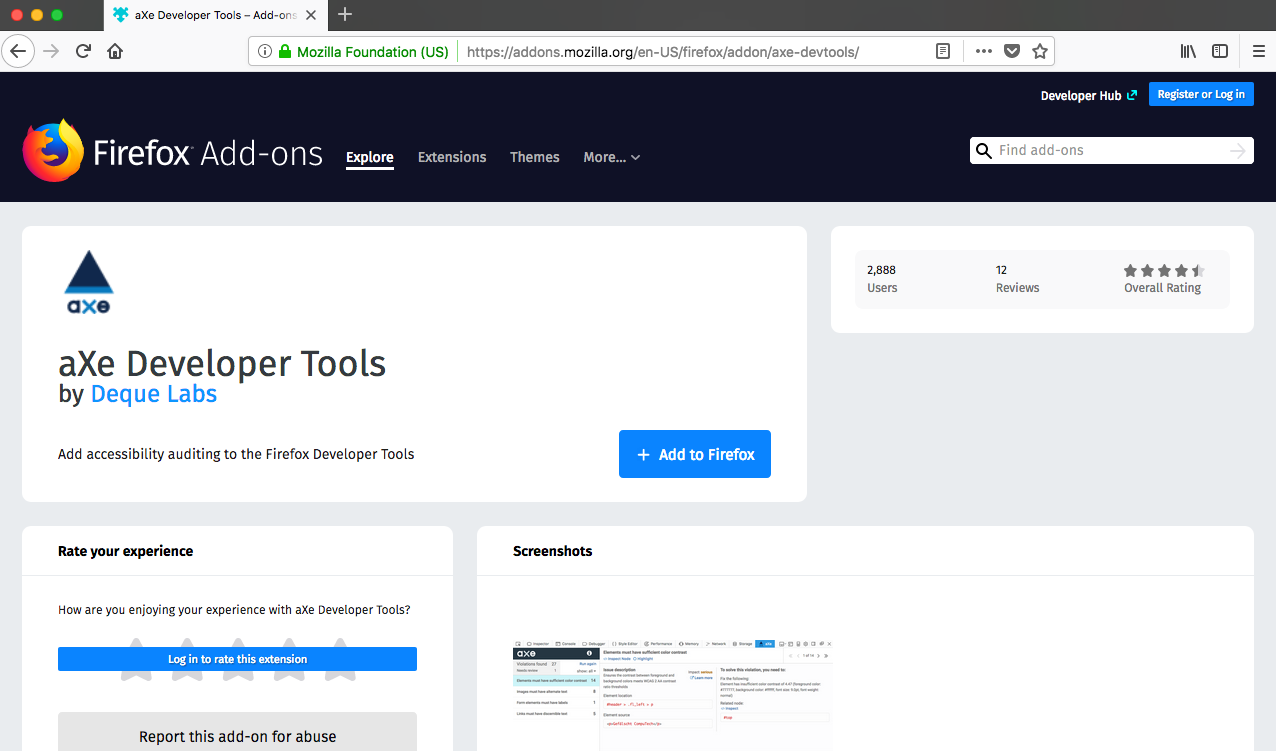
Installation is straightforward. Start by navigating to the download page for the extension (here’s the flow for Firefox):

1. Click on the Add to Firefox button.


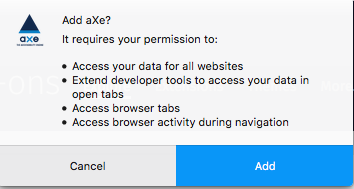
2. Give aXe permission to be added as an extension.


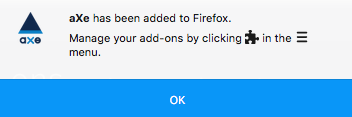
3. After installation completes, this confirmation screen will appear.


4. Depending on how many add-ons you have, you will see something similar to the following on your Firefox browser toolbar.


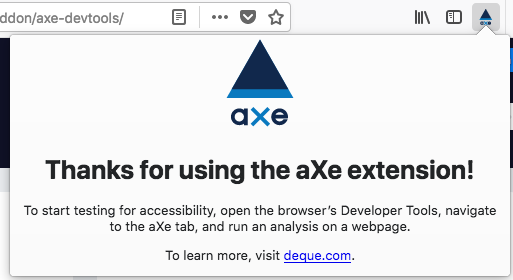
5. Click on the aXe icon to get a help message. aXe is part of Developer Tools and appears within that context.


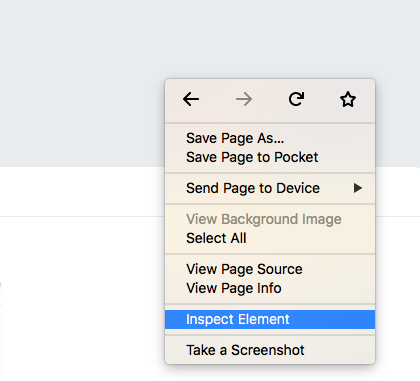
My preferred way to open Developer tools is to just click anywhere in the browser main window, right click, and then select “Inspect Element”.


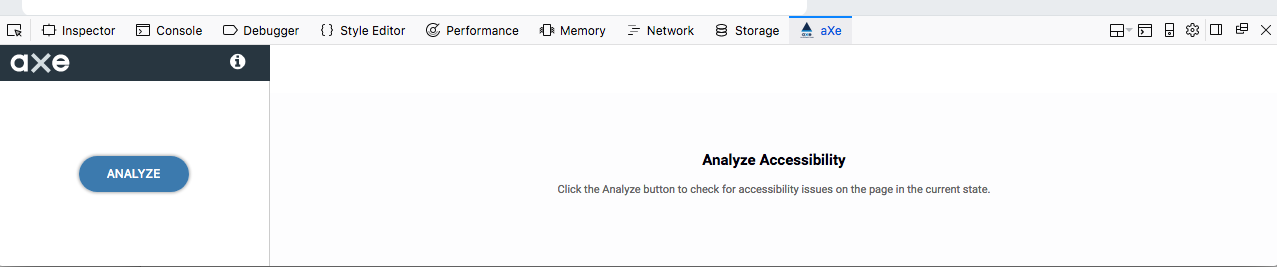
If your installation went correctly, you should see the following. Click on the aXe navigation bar header to see the screen below. If you see this, you are good to go.


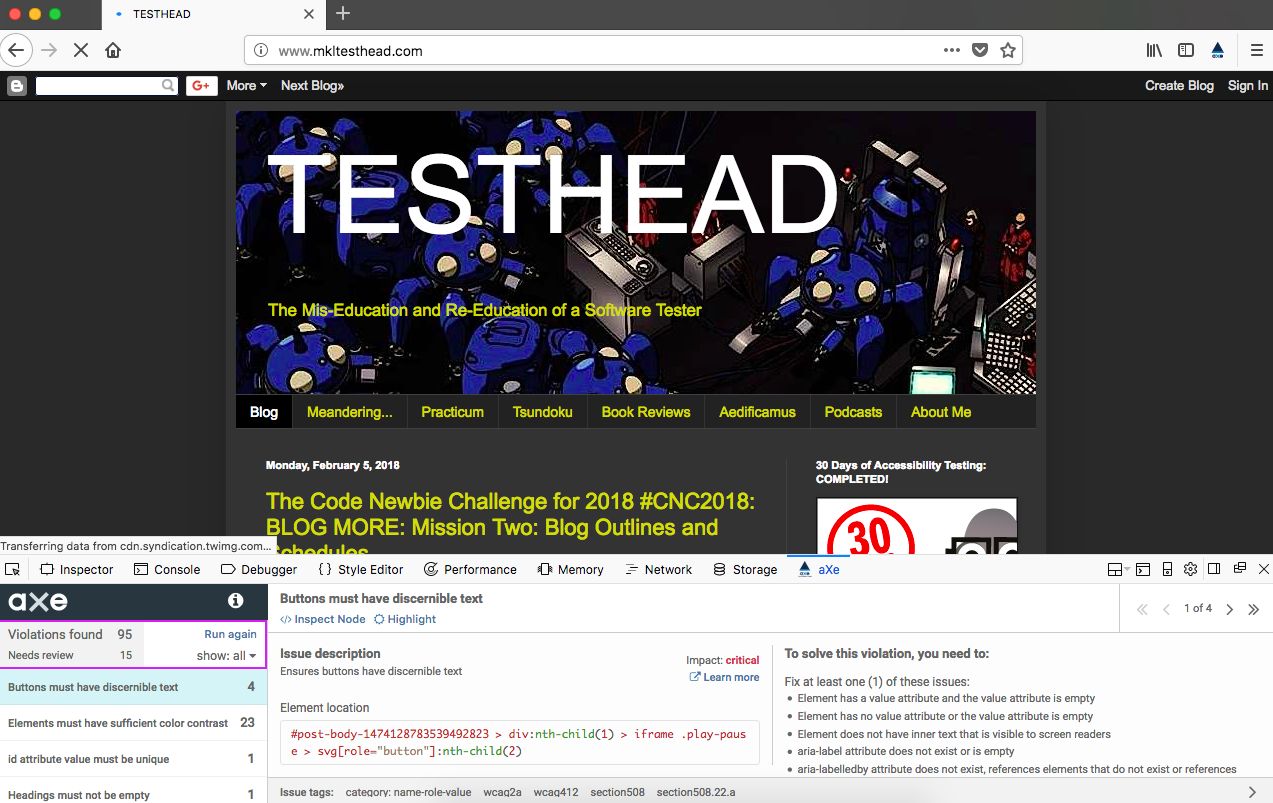
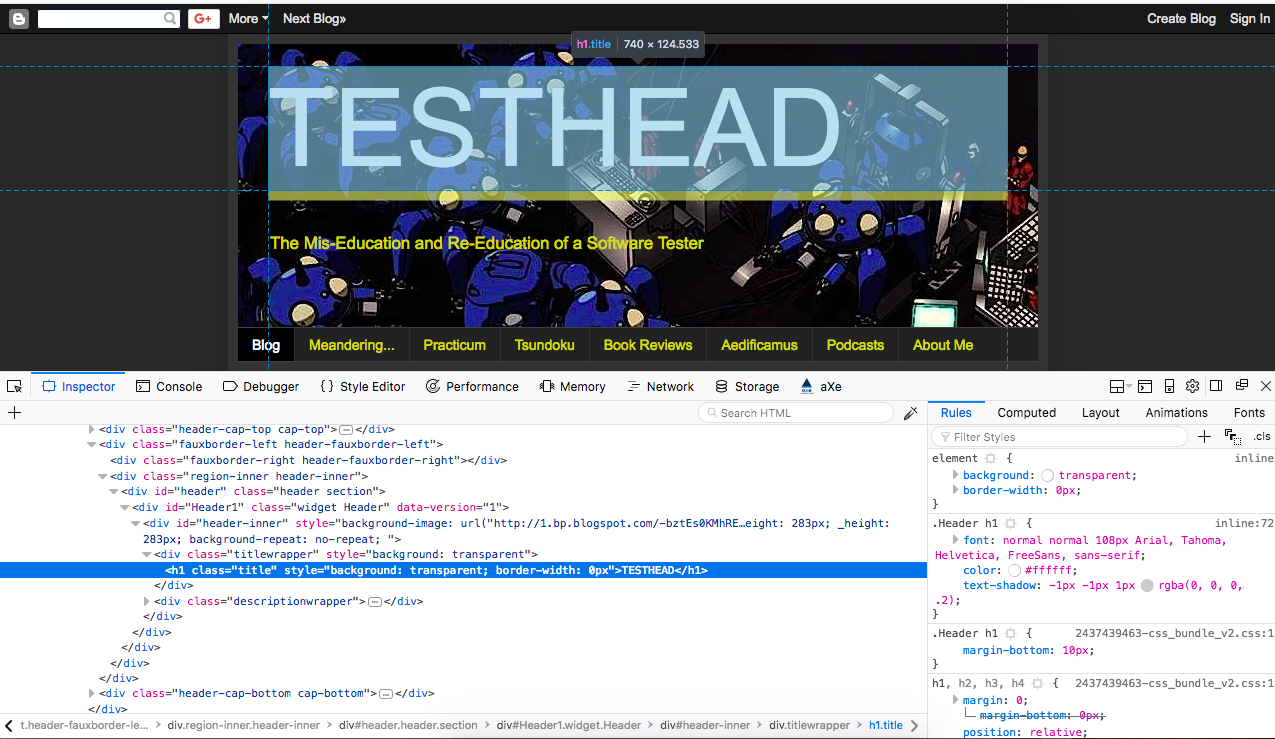
Press the “Analyze” button on your chosen web page. I might as well pick on myself. Let’s have a look at http://mkltesthead.com/.


See that output at the bottom? That’s an indication that I have some stuff to deal with.

I hear you saying, “well, OK, that’s… interesting… what exactly am I looking at here?”


A First Pass at your aXe Analysis
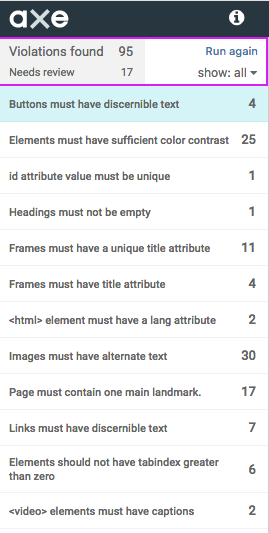
aXe gives the user a condensed listing of issues found. Let’s take a look at the listing in more detail:


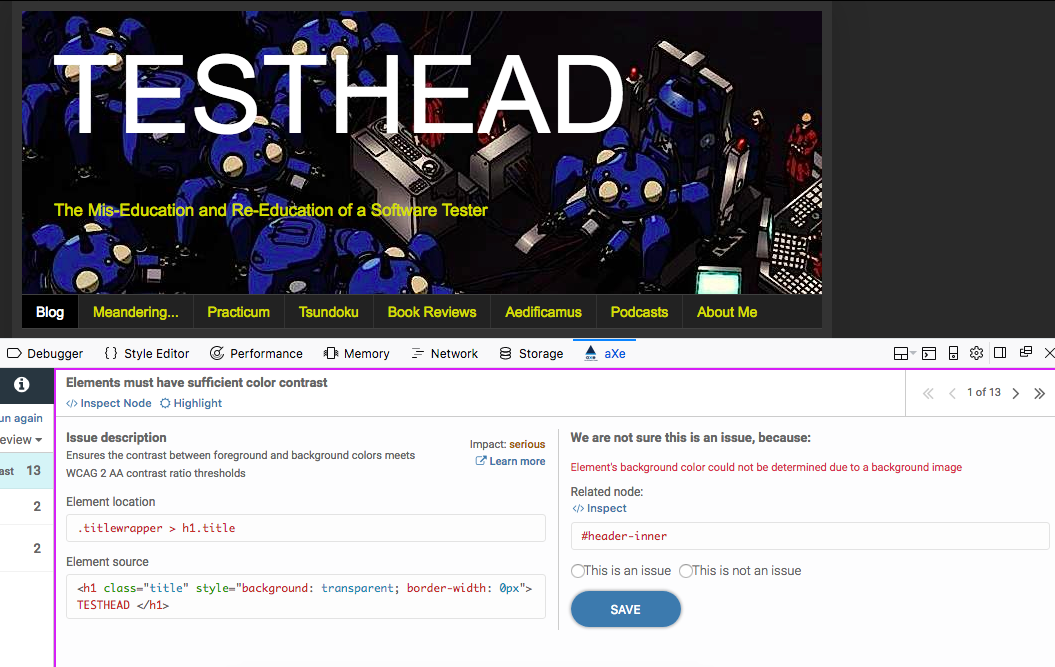
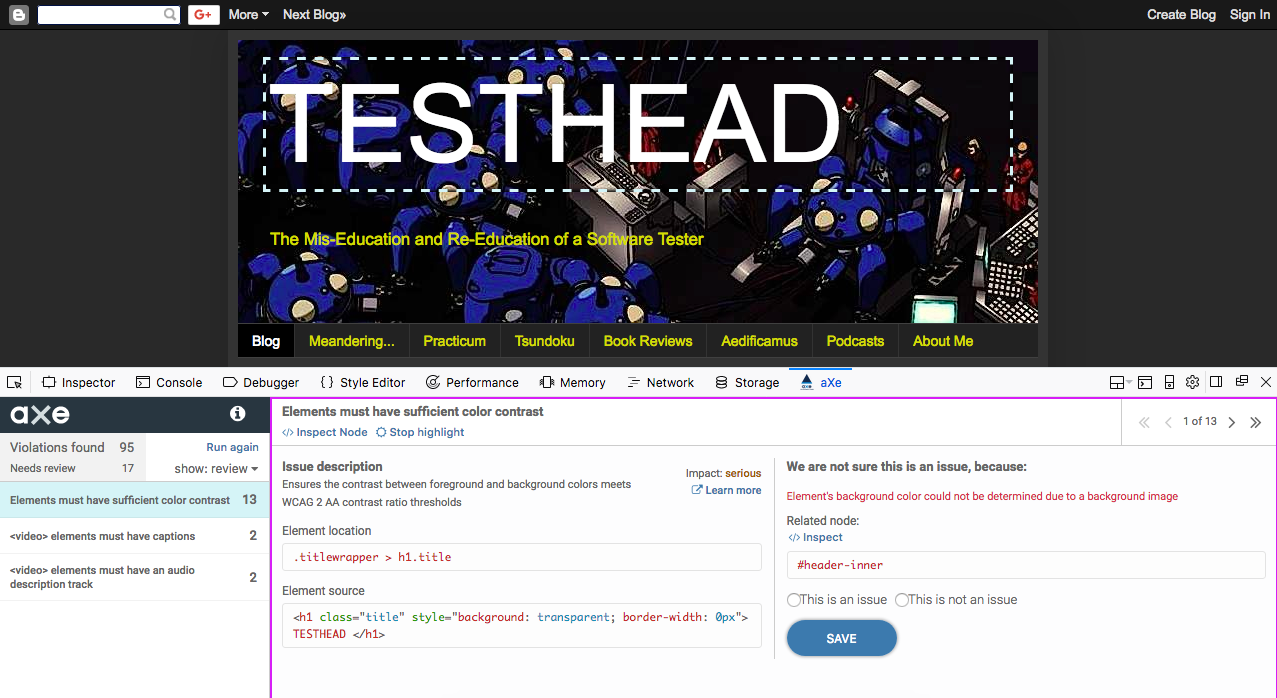
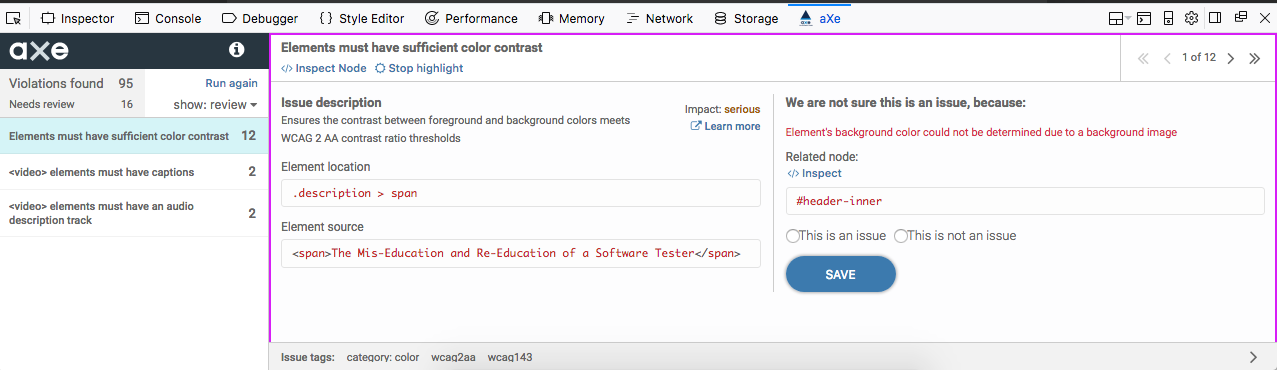
The top section displays the number of Accessibility violations (in this case, 95 of them). The listing below the violations count is an area that says “Needs review”. These are potential violations, but they may not be. Let’s take a look at one of them:


We can see the issue. The validator cannot actually determine if the color contrast of the title is compliant. The reason is that there is an image beneath it, and that image has varying shades, where in some areas there is definitely a bold contrast, but in a few areas, the “whites of the Tachikoma’s eyes” are right next to the text. Below the issue description is the actual code that is being evaluated.

In this case, I have two choices. I can either tell the system that this is not an issue and move on, or I can consider how to match both the letter and spirit of the issue and fix it. Options are I could remove the image, or I could darken the image significantly so that all areas are in sharp contrast.

Additionally, I can do some sleuthing through the tool by clicking on the “Learn more” link next to the description. I can also click the “Inspector” link and see the element in context with the surrounding code for the page:


Clicking on “Highlight” will focus on the element in question but leave us with the review screen:


Having given the code a once-over, I can now (if I choose) make a decision for a course of action. In this case, I am going to make the executive decision to leave the image as it is and say that it is “not an issue” because, for 97% of the text, there is ample contrast.

By selecting “This is not an issue” and clicking the “Save” button, I update the aXe database and move on to the next issue that needs review.


If you followed along, that should give you some feel for how you can quickly use aXe to validate a number of Accessibility issues on your chosen page. There's plenty more where that came from, to say the least, and I will be getting into more details in future posts, both with aXe and a few other favorite Accessibility tools.

Monday, February 5, 2018

The Code Newbie Challenge for 2018 #CNC2018: BLOG MORE: Mission Two: Blog Outlines and Schedules


Week three and mission two are completed. My thanks to Christian Haas for feedback and some additional commentary in this post :).


This week's homework for Blog More is to complete an outline for each of the three blog post ideas.


Homework:
1. Post your favorite outline below.
2. Find someone’s posted outline in the group and give them some feedback. What stands out to you? What points were most interesting? What did you want to learn more about? Be kind but specific in your feedback.

Mission 2:  Outlines and Schedules

My Top Three

1. Writing Code around Accessibility and Inclusive Design
  • Intro: a quick explanation as to what Accessibility and Inclusive Design are.
  • Sample Code that is not accessible and why (web example)
  • Using Inclusive Design Patterns to help set the stage
  • Changes to code that will make it more accessible
  • Methods to check and validate such things
  • Sample Code that now IS accessible and why (web example)


My initial thoughts: 
I’m realizing this is a topic I could write examples for every week for a year and probably still have plenty to write about. I will probably have to tailor this down to an introductory article first and then go into specifics about individual inclusive design patterns, etc.

Christian's comments:
I'm curious about this topic as a whole. For me, your first entry could be about setting the stage, with one or two examples showcasing how far the topic could reach. I myself am more interested from a theoretical point of view. It would affect my daily work only if there were info/references to "closed" systems; I'm not working on web UI, but for a dedicated, trained, target audience using Java UI.

My follow-on thoughts based on feedback:
This is an interesting angle and one I hadn't considered. How do we make applications accessible in a more specific programmatic focus? By Java UI I am assuming these are applications that have a command line style interface or otherwise interactions at the Operating System level and not online or via the web. To be honest, I haven't given a lot of thought to how this would work for a command line application, but it's an interesting thought experiment. When I'm writing a script or some interactive piece of code, how Accessible or Inclusive am I making those interactions? Definitely worth considering.

2. Skeleton Keys: a resource for TDD/BDD in the shell and other programming languages
  • What is skeleton-keys?
  • Why would anyone need it?
  • TDD/BDD in the shell? Really?
  • Unit Testing Tools in three languages (bash, ruby, and python)
  • Starting small: structure, tests, and output
  • Compare and Contrast the three languages and approaches

My initial thoughts:
Why did I pick three languages? OY!!! Oh yeah, so I could actually make some comparisons. I think these might end up being rather long (like book chapter long), but on the plus side, once I get this started, I will probably have plenty to write about for a very long time.

Christina's comments:
Bash: yes - Ruby/Python: is there a particular reason to have both? I don't have experience in either language and see (from the outside) they are somewhat similar in terms of capabilities. Mainly procedural with object-oriented additions; weak type system, and interpreted. For a broader coverage, it should have a variation in perhaps at least two of these points. (e.g., using C, C++, Java, C#, Go, or ...). Since you already identify that this can be done in various languages (taking time and effort to write this), I suggest that, if you want three initial examples, they should be quite distinct from each other. Or reduce to two. (Or give particular reason why Ruby & Python)

My follow-on thoughts:
This is a very good point. I picked Ruby and Python mostly because they are languages I'd been either working with or had some recent exposure to and wanted to set up as a way to focus on some starting poitns for those languages. Having said that, they are two languages that fill a similar niche. They're not the exact same, but Christian makes a good point that they are similar enough that they may not prove to be all that interesting a comparison. Perhaps using a language such as Java or C++ would make more sense, though I haven't used either in a meaningful way in a long time. Still, for this purpose, it may make for a more interesting comparison, so worth re-examining.


3. Creating a framework from the ground up (Jenkins, Docker, Protractor, Angular, Jasmine)
  • You Keep using that ‘Framework’ word. I don’t think it means what you think it means.
  • Jigging your Jig-Saw Pieces (short intro/tutorial on all five pieces, including installation)
  • Setting up a basic application to test
  • Puting the onion back together
  • writing the Angular App
  • testing with Protractor/Jasmine
  • putting it into Docker
  • managing it with Jenkins
  • Lather, rinse, repeat


My initial thoughts: 
This would make for a great series with a minimum of five posts for each piece (plus the many that I haven’t even mentioned yet, such as plug-ins or add ons to make the job easier to manage).

Christian's comments:
With your first point about using "framework" wrong, I suspect this title is intentional. Still, is the overall goal to write a Javascript based template project?
If so, I'd be less interested as I don't work in JavaScript (That should not be a reason to change your goal, I understand that), though, if it were pitched as "how to create a template stack with Jenkins, Docker, ..." might be half interested as I'd consider an automation pipeline for different languages. Perhaps this could even be a two-parter: How to set up a build-pipeline with Jenkins & Docker and then specializing it for a JavaScript project, and then specializing it for a Java project for instance... (These are all just ideas, I believe your thoughts go already in that direction...)

My follow-on thoughts:
Yes, the use of the word "framework" in both the title and the shout-out to The Princess Bride reference is in part to say that the word framework gets thrown around a lot and maybe doesn't really mean what a lot of people think it means. My goal is to address the broad areas and try to see how to implement the pieces. Just setting up the scenario would be a series of posts (setting up Jenkins, working with git, creating docker containers, setting up a project, making tests for the project, running those tests, making sure they integrate with the CI pipeline, etc.). Perhaps skeleton-keys could be the project that allows me to put this all together and integrate into a series of posts.


One thing is certain, this challenge series is showing me that there are plenty of things to write about in these spaces and I will probably have ample to write about for a long time.

Monday, January 29, 2018

Code Newbie Challenge 2018: #CNC2018 #BlogMore: Mission One: Blog Ideas

The first official mission for the Code Newbie Challenge has completed. Here are my follow-up and thoughts about this week's assignment.

Mission 1:  Three Ideas

Goal
Develop and validate the three blog ideas for this challenge.

Homework 
Come up with 10 blog ideas, then narrow those down to 3.

This challenge had a lot of great supporting material to help people get into the mindset of what it would take to create a technical code blog post. 

Research: 
  • Search Twitter for hashtags related to areas of interest.
  • Search blogs that talk about areas of interest. Medium, Dev.to, FreeCodeCamp, Hackernoon, Codeburst, basecs, Mozilla Hacks, etc.
  • Look at Newsletters like JavaScript Weekly and RubyWeekly
  • Think about things I am actively working on and wish there were posts that answered my concerns.

Brainstorm:
Aim for ten ideas. Here's the list I came up with:
  1. Examining Accessibility and Inclusive Design (this is my personal touchstone topic, as if I really want to make a transition to writing code, I want to do it in a way that can help me advocate for Accessibility and Inclusive Design better) - Explainer for concepts, tutorial or project for specifics
  2. Walking through Developer Tools that emphasize Accessibility - Explainer
  3. Making a Skeleton Resource for Coding (my biggest problem is getting started, so my overall goal is to make something that will help me do that. I figured I could explain along the way as I make it). Project, possibly tutorial
  4. Writing shell scripts using TDD and BDD principles (using shunit2) - Tutorial, Project
  5. Quick Fixes for Big Headaches (the shell can be your friend) - Project
  6. Deploying your own little CI Pipeline (Deploying Jenkins on your local machine) - Tutorial, Project
  7. Containers for the curious (Deploying Docker on your local machine) - Tutorial, Project
  8. Blending Angular, Protractor and Jasmine into a testing framework - Tutorial, Explainer, Project
  9. Road Rash: Cautionary Coding tales while the wounds are still healing (I did something, I got stuck, it hurt but I figured a way out of it) - Explainer
  10. How Would You Automate This (an actual Series I’m Currently Working On) - Explainer

Narrow it down to 5:
Many of the ideas I came up with are not so many ones I would want to eliminate as they are either peripheral to or prerequisite of what I'd want to write about. By taking my original list and grouping them, I came up with the following more condensed list:

  1. Examining Accessibility and Inclusive Design, Walking through Developer Tools that emphasize Accessibility  - Explainer for concepts, tutorial or project for specifics
  2. Making a Skeleton Resource for Coding, Writing shell scripts using TDD and BDD principles, Example shell fixes to demonstrate the project - Project
  3. Deploying your own little CI Pipeline (Deploying Jenkins on your local machine), Containers for the curious (Deploying Docker on your local machine), Blending Angular, Protractor, and Jasmine into a testing framework - Tutorial, Explainer, Project
  4. Road Rash: Cautionary Coding tales while the wounds are still healing (I did something, I got stuck, it hurt but I figured a way out of it) - Explainer
  5. How Would You Automate This (an actual Series I’m Currently Working On) - Explainer
One of the reasons I ordered this list this way is that I couldn't figure out how to put Road Rash into another location other than as a sidebar, and it felt the weakest of my choices. How Would You Automate This I deliberately put at the bottom as I'm already writing the series. I want to emphasize posts and areas that I'm not already doing or that would actually be new territory for me.

Validate your ideas
I received some great feedback and interest from several people who reviewed my list and who expressed interest in seeing certain topics get covered. That had a lot to do with my grouping and decisions on which topics I would want to focus on.

Pick your top three

The top three and the working titles for each:
  1. Making Your Pages and Apps Accessible Using Inclusive Design Principles
  2. Skeleton Keys - A Project for Getting Started in bash, Python, and Ruby
  3. A Testing Framework From the Ground Up - Jenkins, Docker, Angular, Protractor, Jasmine

Turn In Your Homework 
 
Turned in to the CNC2018 Facebook group, but also this blog post :).
 
Bonus Reading 
 
Here are some additional blog posts to check out:

Monday, January 22, 2018

The Code Newbie Challenge for 2018 #CNC2018: BLOG MORE: Introduction

Hello to new readers that are coming across this blog for the first time. To those who have read these pages for a while now, this should not surprise any of you at all ;).

I've decided to take on the Code Newbie Challenge for 2018. There are four "tracks" that you can choose. They are:

Start Coding
Code More
Blog More
Get a Job


I have chosen the "Blog More" challenge for a specific reason. Much of the time on this blog I have talked about testing and peripheral topics from a layman's point of view. I've strived to "speak dude" as often as possible, and to that end, I've kept coding specific stuff to a minimum. that sounds like a simple answer, doesn't it? Well, let's get real here. There's a darker secret. Part of the reason why I don't post code frequently is that I harbor a fear that people will look at my code and think it's simplistic, stupid or just plain lame. To tell the truth, that may happen. Maybe it won't. Regardless, I've always been a little leery of posting code samples beyond language tutorials because I've just been concerned about getting it picked apart.

That's the overwhelming reason why I chose this challenge. I can't get better if I don't actually put something out there, right? I can talk a mean game about what I know about things like automation and web development, but does it really matter if my actual code is lacking? More to the point, wouldn't it make a lot of sense to actually talk about code, show examples, explain it from my perspective and let people who do know about code comment on it?

Sure, it might bruise my fragile ego but isn't that the whole point? How do I expect to learn or actually demonstrate I know anything if I'm not willing to show what I actually know and take the chance that someone might be willing to tell me a better way to do it? On top of that, there may be lots of things I may be doing that are actually interesting and may be helpful to others. Finally, if I can explain what I'm doing in a blog post or several, I can explain it to anyone and draw on it when I write code in the future.

Let's get this party started. Each assignment as part of this challenge will be posted here. This is my own preamble to get the ball rolling. Look for the tags CNC2018 and CodeNewbieChallenge to see posts specifically targeted for this challenge.

Exercise Zero: The Pre Mission

Read 3 tech blog posts you wish you wrote. Jot down why you like them and what you'd change.

Find examples of good tech writing to see what you'd like to incorporate into your own posts, and what you might want to avoid. 

You'll refer back to these later in your challenge.

There are three styles that were described for this challenge. First is the "Tutorial", which actually walks through how to do something. Second is the "Explainer", which take a concept and breaks it down. Third is the "Project" which describes how to do something and gives actual examples that you can follow along and build yourself. The pre-challenge is to pick three examples, (one from each category) that I wish I had written, describe what I like about it, and what I would like to see to improve the piece.

Tutorial: "Protractor for Beginners, Part 1" by Hannah Pretswell

Why a tutorial on Protractor? Because it's what we are exploring as a replacement for our current automation framework. Nothing like a pressing business need to get your mind racing and your thoughts flowing. Hey, you know it will come in handy very soon, right? For starters, let me comment on something I really appreciate. Hannah said she struggled with getting the pieces to work together. Hearing that up front helps me in two ways. First, it lets me know that the tasks ahead may be challenging. Second, she also lets me know that she's done her best to document those frustrations and help let me know that I likely will succeed if I'm patient and follow her advice. Too often, I've gon through tutorials that expect a user to jump in and get moving with little concern over the sticking points. Gladly, that's not the case here.

Another positive is the fact that there are a fair number of repetitive steps. It's tempting to spell them all out, but by doing so, it makes updating a tutorial daunting and thus something the writer would likely not do. Instead, she points to a few additional tutorials already written that explain the process of setting up your environment and making sure everything is working correctly before getting started. Additionally, the resources listed point to the protractor GitHub page. This is a good practice because it lets the user get started with the most recent advice from the maintainer of the framework so that if the instructions change, the writer of the tutorial doesn't have to be the one to change the details on her site as well.

So, what would I have done differently? Truthfully, not much. I think it's a solid opener and it goes through the specifics as the first part of a tutorial should. I suppose I would have liked to have seen some example output of the code as displayed and some output of tests as well. For me, with a variety of tutorials, I think this is a good step so as to show what you could expect. I understand why many people don't in that OS changes and formatting details could put images like that out of date quickly, and it does add overhead to downloading what would in many cases be pictures to demonstrate the output. Still, on the whole, this is a really solid example.


Explainer: Test Driven Development in BASH by Torstein Krause Johansen

This is presented as a talk, but in many ways, that's a great way to explain a concept in a few words, with the impetus on the reader to go and learn more if they are so inclined. Specifically, I like the curt and focused content, the way the information is presented and the walkthrough of the ideas with examples. Each slide builds on the previous one and lets you see why the topic makes sense and the reasoning behind Torstein's approach. I was also excited to learn about shunit2 and I must say I'm more than a little curious at this point.

So what would I do differently? Again this is a set of slides from a talk, and at first glance, I'm guessing the HTML code was put there for a reason, but if the point was to demonstrate bash syntax and how it interacts with a testing framework, the HTML was distracting and made the underlying code hard to read. Again, I may be missing a key context here as to why that was presented that way (perhaps to prevent copying and pasting willy-nilly) but if that were the concern, I could see saving screenshots of the code itself and displaying pictures (great to prevent copy and paste but admittedly a nightmare to update and keep current).

Project: 10 Angular and TypeScript Projects to Take You From Zero to Hero by Dan Wahlin

This interested me seeing as I will be doing work with Protractor and Jasime as a testing framework for Angular apps. To that end, it helps to have something to look at, play with and practice on and these ten projects will allow me to do that. I like that the projects start simple and get progressively more difficult as they go. Each project is laid out with sample images of what you will build with links to each of the projects so that the project page is independent of each of the individual listed projects. The projects are lust listed with a title, a basic description, level of difficulty, a link to the files and some pictures of what the project will look like when completed.

On the whole, this is a nice layout and method. It leaves it up to the individual reader to decide where to expend their energy and each project simply links to the necessary packages to get them done. Were I to do it myself, I would probably split each project out to its own page and try to give some instructions about what to do with each. Having said that, the economy of having ten projects to choose from without a lot of navigation and page dancing is a good tradeoff.

There's the start. The assignments proper start on January 22, which is the same day this post goes live. Feel free to follow along and, as I tackle each assignment, your feedback and commentary is appreciated :).

Wednesday, August 23, 2017

Regarding Comments and Interaction on TESTHEAD

As I've been going through the site to determine changes I want to make regarding Accessibility and Inclusive Design, I've been doing a review of past posts (with more than 1,000, this is taking awhile, but I'm getting there). In the process, I've also noticed a recent uptick in comments. At first, I was excited, but quickly saw that most of them tended to be the same:


nice blog has been shared by you. before i read this blog i didn't have any knowledge about this but now i got some knowledge. so keep on sharing such kind of an interesting blogs.

This would then be followed by a link to some other site, usually offering training of some kind.

At first, I tended to approach this with a bit of a buzzsaw approach, just deleting them out of hand, but during CAST, I talked to a friend and colleague and described my frustration with this approach. They suggested something I hadn't considered. It may be SPAM. It probably is SPAM if it is linking to a commercial link, but there is a possibility that this is also a new student fulfilling a class assignment to find a technical blog, read a post and comment on it.

Fact is, I don't know, but the better, possibly more naive part of me wants to believe that some of this traffic might be legitimate, so I'm going to make a few requests.

1. If you read something that you appreciate, let me know specifically what you like about the post. That at least gives me an indication that you have read it.

2. Ask me a question about the post. This may be a mild psych thing with me, and I may regret admitting this down the road, but I'm the type of person that, if you ask me a question in social media or via blog posts, I feel compelled to answer. My answer may be "I don't know" or "I'd have to point you to [x]" but I will answer :).

3. If you are posting a link to a site that supports or substantiates what I'm saying, or disproves what I'm saying, that's fair game. Posting a link to your training site without at least explaining why you are doing so is just rude. If you are saying "Hey, I like the pattern matching examples you gave in your post. I'm currently attending a training academy that also covers this, and you might find this useful (link to a specific example that corresponds with the blog post)", seriously, I'm fine with that.

Nonsensical praise like what's posted above tells me that you haven't even read the blog post, you want to get your link on as many of my page as possible, and will guarantee that I will go through and mow such comments out of my feed aggressively. Also, the time I have to spend chopping out bunches of bogus comment posts limits the time and attention I can spend writing new stuff.

For those who have posted informative and inquisitive comments, I thank you and appreciate the fact that you do so. For those who want to do so, but aren't sure how I promise, I'm a rather wordy fellow who is happy to answer questions and do not mind sharing links of a genuinely informative nature. Let's make this a place where we can communicate ideas and not a jumble of SPAM comments that I have to consistently prune.

Thursday, August 27, 2015

How Many Words Do You Have Left In You?

This may seem like a borderline macabre post, but it was prompted by my recent deep dive into the CodeNewbie podcast. Episode #17 featured Scott Hanselman (a great episode about engaging with new programmers or anyone in tech) and one of the comments that he made was the idea that we all have a limited amount of keystrokes left in each of us.

Scott breaks it down like this. Think of how old you are now. Now consider a conservative life span. For me, to date, the direct line of males in my family have lived to 82 at the latest, though my Dad is looking great at 75 and shows no signs of slowing down yet, so that's a plus :). I'll take a mid figure and say 78. that means I have about thirty years of words left in me. Divide that by the number of hours I work in a given day, and then divide that by the minutes in those hours, and then divide that by the number of words I type, and there you have it.

The point to this is that we have a lot of things we can do, but often we end up doing things that are repetitive and can possibly be of benefit to others if we do them the right way. In other words, instead of answering emails with the same questions, writing blog posts and pointing people to them might prove to be of more benefit.

I was reminded of this a week or so ago as I realized that on any given week, a big portion of my traffic comes from the series of posts I wrote four years ago when I embarked on "Learn Ruby the Hard Way". My rationale was that I was already looking at this stuff, and experimenting with it. I wanted to take notes and see if I could explain what worked and what didn't. If it didn't, was it a problem with the material, or was it a problem with me? More times than not, I'd discover it was a problem with me, or my understanding of the material. By talking out the ideas in the blog posts, and rereading them back to myself, often I was able to uncover problems just by talking out the problem, as though someone else was there to listen. Four years later, those experiments, frustrations and discoveries are still bearing fruit.

To me this highlights the importance of us documenting our journeys. It's tempting to say that a blog post is just a blog post, and that in the grand scheme of things, doesn't amount to very much. I think the opposite. To borrow again from Scott, by putting a URL to our words, we have the potential of seeing our words outlive us. Granted, the specifics of our posts may ultimately prove to be outdated, but the general process of learning, discovery, and our individual journeys along the way have timeless truths that may well prove to be valuable to other travelers. In the ideals of Will Allen Dromgoole, "I'm building a bridge for them" or at least I hope to.

The tl;dr version of this is "find ways of sharing your discoveries, and do what you can to limit the repetition of what you say". If you truly say it once, say it in a chat or an email. If you find yourself referencing it more that that, blog it. You never know what piece of advice you may have hidden in a chat transcript or an email thread that may help hundreds or thousands of others.

Wednesday, December 10, 2014

Diversity is More than Skin Deep: New Uncharted Waters Post

A short post to say that I have a new entry up over on the IT Knowledge Exchange Uncharted Waters blog. It's titled, "You Keep Saying Diversity, Does it Mean What You Think it Means?"

As I discussed in my live blog posts at EuroSTAR a couple weeks back, many of the discussions are based around "external diversity". Understand, the current environment for many companies and events makes that conversation extremely relevant. I am sensitive to the fact that there is not a broad representation in the computer sciences or in information technology, and yes, gender, ethnicity, and mobility are important areas to focus on.

Less discussed are the areas inside of each of us that make us unique, and dare I say it, possibly hard to manage. This article is meant to keep the conversation going and look at the other less obvious areas where diversity may be taking a hit, even while we are focusing on external factors.

Please have a look, share your comments on the article page, and hey, while you're at it, perhaps consider making Uncharted Waters a regular stop. Between Matt, Justin and myself, we post a number of interesting articles about software delivery, technology, work, the changing technical landscape, and yes, even some software development and software testing, too.