Tuesday, October 10, 2023

Continuous Testing Integration With CI/CD Pipeline (PNSQC)

Today, I'm taking a walk down memory lane. I'm listening to Junhe Liu describe integrating various automatic tests into the CI/CD pipeline.


It's interesting to think about where we are today compared to 30 years ago when I first came into the tech world. Waterfall development was all that I or anyone knew (we may not have wanted to call it that, or we'd dress it up. Realistically speaking, any given release was a linear process, and each sequence flowed into each other. While I had heard of Agile come the early 2000s, I didn't work on such a team (or one that presented itself as such) until 2011. 

Likewise, it was around the mid-200s that I started hearing the idea of Development and Operations being two great tastes that went better together being discussed ;). Again, it wouldn't be another decade until I saw it in practice but over time, I did indeed start to see this and I was able to participate in it. 

One of the interesting arrangements in the group I was working at (Socialtext), every member of the team had their turn at being the "Pump King". That's a piece of lore that I miss and it is a long story involving an old USB drive that was kept in a toy jack-o-lantern bucket, hence the person who took care of the protective pumpkin became known as the "Pump King" and after everything went online, the name stuck. The key point was that the Pump King was the person responsible for the Jenkins system and making sure that it was working, up to date, and patched when necessary, as well as running it to build and deploy our releases. Every few weeks, it would be my turn to do it as well. 

Thus it was that I was brought into the world of Continuous Delivery and Continuous Deployment, at least in a limited sense (most of the time this was related to staging releases). We actually had a three-tiered release approach. Each developer would deploy to demo machines to test out their code and make sure it worked in a more localized and limited capacity. Merging to the staging branch would trigger a staging build (or the pump king would call one up whenever they felt it warranted, typically at the start of each day. We'd run that and push changes and version numbering to our staging server, and then we'd run our general tests, as well as all the underlying automated tests with the Jenkins process, of which there were a *lot* of them. Finally, due to our service agreements, we would update our production server and then push uploads to customers who opted in to be updated at the same time. We never go to production daily pushes but weekly was more common towards the end of my time on that product.   

It was interesting to get into this mode and I was happy that we were all taught how to do it, not just one and when needed but that all of us were expected to be able to do it at any time. Thus all of us knew how to do it and all of us were expected to do it every time it was our turn to be Pump King. 


Monday, October 9, 2023

Learning, Upskilling, and Leading to Testing (Michael Larsen with Leandro Melendez at PNSQC)

You all may have noticed I have been quiet for a few hours. Part of it is that I was giving a talk on Accessibility (I will post a deeper dive into that later, but suffice it to say I shook things up a little, and I have a few fresh ideas to include in the future).

Also, I was busy chatting with our good friend Leandro Melendez (aka Señor Performo), and I figured it would be fun to share that here. I'm not 100% sure if this will appear for everyone or if you need a LinkedIn login. If you can't watch the video below, please let me know.


We had a wide-ranging conversation, much of it based on my recent experience being a testing trainer and how I got into that situation (the simple answer is a friend offered me an opportunity, and I jumped at it ;) ). That led to talking about ways we learn, how we interact with that learning, and where we use various analogs in our lives. This led us to talk about two learning dualities I picked up from Ronald Gross' "Peak Learning" book (Stringers vs. Groupers) and a little bit about how I got into testing in the first place.

It's a wide-ranging conversation, but it was fun participating, and I hope you will enjoy listening and watching it :).

Common Pitfalls/Cognitive Biases In Modern QA with Leandro Melendez (PNSQC)


Ah yes, another date with the legendary Señor Performo :). 

Leandro is always fun to hear present and I particularly liked the premise of his talk as I frequently find myself dealing with cognitive biases, both in the way of locating them when others use them but also to admonish myself when I do (and yes, I do fall prey to them from time to time). 


I've been in the process of teaching a class for the past few months related to software test automation, specifically learning about how to use a tool like Playwright with an automated testing framework. To that end, we have a capstone project that runs for three weeks. As anyone involved in software development knows, three weeks is both a lot of time and no time at all. This is by design, as there is no way to do everything that's needed, and because of that, there are things that we need to focus on that will force us to make decisions that will not be optimal. This fits into the conversation that Leandro is having today. How do you improve and get better when you have so many pressures and so little time to do it all? 

Note: I am not trying to throw shade at my students. I think they are doing a great job, especially in the limited time frame that they have (again, by design) and seeing what choices they make (as I'm literally a "disinterested shareholder" in this project, meaning I care about the end product but I'm trying my level best to not get involved or direct them as to what to do. In part, it's not the instructor's role to do that but also, I'm curious to see the what and the why concerning the choices that are made).

We often act irrationally under pressure and with time limitations. Often we are willing to settle for what works versus what is most important or helpful. I'm certainly guilty of that from time to time. An interesting aspect of this, and one I have seen, is the "man with a hammer" syndrome, where once we have something we feel works well, we start duplicating and working with it because we know we can have great wins with that. That's all well and good but at times, we can go overboard. Imagine that you have an application with navigation components. You may find that many of those components use similar elements, and with that, you can create a solution that will cover most of your navigation challenges. The good thing? We have comprehensive navigation coverage. The disadvantage? all of that work on Navigation, while important and necessary, has limited the work on other functionalities with the unit under test. Thus, it may be a better use of time to do some of the navigation aspects and get some coverage on other aspects of the application rather than have a comprehensive testing solution that covers every navigation parameter and little else to show for it. 

Another example that Leandro gives is "Living Among Wolves" or we can consider this an example of "conformance bias" meaning that when we do certain things or we are part of a particular environment, we take on the thinking of those people to fit in with the group. Sometimes this is explicit, sometimes it is implicit, and sometimes we are as surprised as anyone else that we are doing something we are not even aware of. 

The "sunk cost" appears in a lot of places. Often we will be so enamored with the fact that we have something working that we will keep running and working with that example as long as we can. We've already invested in it. We've put time into it, so it must be important. Is it? Or are we giving it an outsized importance merely because we've invested a lot of time into it? 

One of the lessons I learned some time back is that any test that never fails is probably not very well designed or it offers little value in the long run. It's often a good idea to approach tests both from a positive and a negative perspective. It's one thing to get lucky and get something that works in a positive/happy path test (or not necessarily lucky but limited in what's being done. Now, does your logic hold up when you inver the testing idea? Meaning can you create a negative test or multiple negative tests that will "fail" based on changing or adding bogus data or multiple bogus data examples. Better yet, are you doing effective error handling with your bogus data? The point is, that so many of our tests are balanced to only happy path, limited depth tests. If you have a lot of positive tests and you don't have many tests that handle negative aspects (so that the incorrect outcome is expected... and therefore makes a test "pass" instead of fail), can you really say you have tested the environment effectively?   

Ending with a Shameless plug for Leandro. Leandro is now an author, having written "The Hitchhikers Guide To Load Testing Projects", a fun walkthrough that will guide you through the phases or levels of an IT load testing project. https://amzn.to/37wqpyx

Amplifying Agile Quality Practices with Selena Delesie (PNSQC)

I had the opportunity and privilege to introduce Selena Delesie on the program today. It was fun to reminisce a bit because Selena and I were both in the same Foundations class for Black Box Software Testing all the way back in 2010. We also both served on the Board of Directors for AST, so we had a lot of memories and fun/challenging things to deal with over the years. Thus, it was a pleasure to introduce Selena as our first Keynote speaker. Also, part of her talk was discussed on a recent The Testing Show podcast, so if you want a sample, you can listen to that :).

Selena Delesie

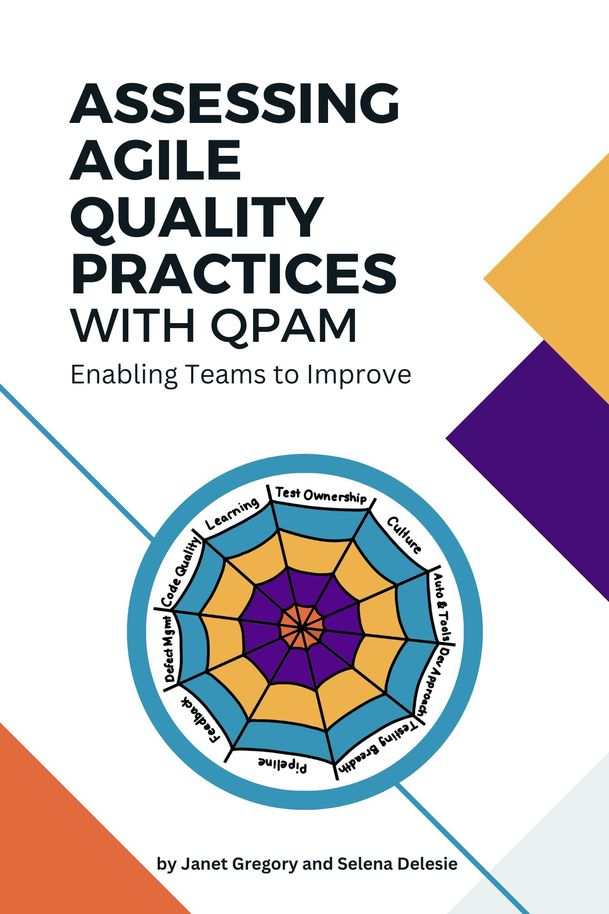
The tool that Selena and Janet Gregory put together is called the Quality Practices Assessment Model (QPAM). The idea behind this is that there are ways to identify potential breakdowns in the quality of our work. Areas we should consider are:

  • Feedback Loops
  • Culture
  • Learning and Improvement
  • Development Approach
  • Quality and Test Ownership
  • Testing Breadth
  • Code Quality and Technical Debt
  • Test Automation and Tools
  • Deployment Pipeline
  • Defect Management

The fascinating thing is the order and how these are identified and examined. Selena makes the case that the order in which these are presented and examined is important and by examining them in this order or weighting, the best chances for overall and lasting improvement are possible. Yes, Defect management is important but it will be less effective if more weight is not given to the previously mentioned items.

A key aspect to this is that quality is not just a technical issue, it's also a social issue and it should not be dealt with in isolation. Selena introduces us to a group code-named "Team Venus" and identifies many of the issues they are facing and where those issues fall on the ten quality aspects. The key element is that each area is looked at holistically and in conjunction with the other areas, not in isolation. As anyone familiar with GeneralSystems Thinking can tell you, there is no such thing as a standalone and isolated change, any modifications made will have ripple effect. It's also critical to realize that a process alone is meaningless if the overall values are not solid or agreed upon. 

In the ten quality aspects that Selena referenced, there are four quadrants/dimensions to consider:

  • Beginning
  • Unifying
  • Practicing
  • Innovating

What I like about considering these as quadrants is the fact that these areas are not separate from each other but they are dependent on each other. Some areas of the ten practices will be closer aligned with a particular dimension. Additionally, it's common for teams to spend more time in a given quadrant/dimension for the ten areas than others. I like the diagram Selena uses that looks like a spider web. The center of the web means that that is an informational or foundational level, and the farther out from the center, the greater the expertise and experience. Ideally, of course, all of the aspects should be on the outer rim of the spider web but in practice, there will be color splotches in all four of the dimensions. That is normal and should not be discouraged, especially since each new team member will typically need to start from zero.

For those interested, the book and full model example for Team Venus is available in "Assessing Agile Quality Practices with QPAM" so if you want to learn more, go there.

Amping It Up!: Back at the Pacific Northwest Software Quality Conference


It's that time of year once again. I'm excited to be at PNSQC and in a new location. We are at the University Place Hotel and Conference Center, which is part of Portland State University. This is the first time PNSQC has been here but not the first time I've been here. A few years back, in 2018, they had run out of rooms at the primary hotel, so I had to find someplace else to stay. 

I happened upon University Place, and while it was a walk from the previous venue at the Portland World Trade Center, it was a comfortable hotel, and I liked my stay. As we were looking for different places to hold the conference this year I mentioned my experience and thought it would make for an excellent possible venue. And thus, here we are. It wasn't solely up to me but I definitely put in a good word ;).

This year's conference is a strange feeling for me, as it is one in which I am feeling unsure and unsteady after many years. I am at the tail end of a contract I've been working for several months. In a few weeks, barring any changes or new contracts, I will be out of work again. Thus I am attending this conference from a different headspace than usual. Previously, I was looking for small tips I could bring back to do my current job. This year, part of me feels the need for a literal reinvention. I'm having that uneasy feeling that I have too many potential options and not enough time to consider them all, so this year's talks are probably going to be focused on my current mental state. If you see me attending talks that may seem different or out of character, that's why.

Additionally, this year had an additional challenge and excitement in that I was the Marketing Chair for PNSQC this year. If you felt that there was either too much or not enough of a marketing presence for the conference, I get both the praise and/or the blame. Either way, for those who are here and for those following along, I'm happy you are here.


Wednesday, May 24, 2023

The Different Dimensions of Accessibility: Cognitive: Training for Accessibility (Part 6)

While often overlooked, cognitive disabilities are perhaps one of the most common yet least seen of the disability families we have discussed. Cognitive disabilities are varied and present some challenges that can affect how navigate and interact with online content. 

word cloud for cognitive disabilities: words include cognitive, disability, 
area
, attention
, experience, 
fatigue
, hemingway, 
memory
, situation
, stress
, user
word cloud for cognitive disabilities: words include cognitive, disability, area, attention, experience, fatigue, Hemingway, memory, situation, stress, user


Cognitive disabilities cover a broad range of conditions. Memory, attention, comprehension, and problem-solving are all affected, and for some people, all of the boxes are checked. 

Primary Disabilities

Down Syndrome: a genetic condition where people have an extra copy of chromosome 21. Cognitive impairments, delayed development, and distinctive physical features are often seen in this condition. Levels of cognitive impairment can vary from mild to severe.

Dyslexia: a learning disability that can affect reading, spelling, and language comprehension. They may swap letters or read certain characters out of order or need to step back and slowly read the text to process what they are seeing.

Dyspraxia: Also referred to as Developmental Coordination Disorder. While often considered a mobility disability, dyspraxia can also have an effect on the actions of writing and typing and cause stress to cognitive functions as well.

Traumatic Brain Injury: A sudden impact to the head such as a concussion or bone breakage in the skull can cause long-term issues with memory, attention, and problem-solving.

Fetal Alcohol Spectrum Disorders: people exposed to pre-natal alcohol in high amounts during their development in pregnancy can develop a range of disabilities. these can affect memory, attention, impulse control, and social skills.

Secondary/Situational Disabilities

Cognitive disabilities are perhaps one of the areas where situational disabilities may be the most prevalent. There are numerous situations that can put a strain on our mental faculties and can cause us issues that are not necessarily long standing. Many of these share similarities but these are all situations any of us could find ourselves dealing with.

Cognitive Overload: stressed, fatigue, or just having a million things coming at us all at once. These situations can make it more difficult for us to process information and make decisions.

Reduced Attention Span: again, stress and fatigue can contribute to this, as well as side effects of medication or recreational alcohol or drug consumption. 

Memory Impairment: there can be a lot of situations that lead to this. Again, stress and fatigue but also just being in an unfamiliar or foreign environment, especially one where the language that is spoken/written is foreign to you. 

Design Considerations for Cognitive Disabilities

When we want to address Accessibility and accessibile design for cognitive issues, it's important to realize that each area is unique, and individuals within these categories can have varying strengths, challenges, and needs. This is definitely the area where one size will not fit all and a lot more judgment calls are required. Still, here are several suggestions that should help considerably and make the experience better for all users.

Avoid Complex Navigation: having multiple layers of nested content or menus of menus is not ideal. It's easy to lose track of where a user is and then trying to get back to that location could be challenging if not impossible. Try to limit menus to one layer at maximum if possible.

Avoid Overwhelming With Information: A wall of text is not welcoming to anyone and for people with cognitive disabilities it is even more daunting. Try to use space, break up large paragraphs, and aim for a simplicity of message where it makes sense. 

Allow for Longer Time Limits: Aim to make it so that timers or time pressures are minimized. Some systems require this but make it so that the value can be adjusted reasonably

Provide Alternative Means for Content Display: Have clear labels and do not assume that users will get by inference what is meant by using a color in isolation or a metaphor that may be well known but some people may not be aware of that meaning. Provide clear labels and alternatives that will provide more context if necessary.

Avoid High Contrast or Flashing Content: this is an example of where a suggestion that works well for one group could be a distraction or a problem for another. High contrast screens that help those with vision issues could be too stressful to read or look at for people with cognitive disabilities. Having the ability to easily adjust the contrast can be a big help. Overly aggressive flashing and strobing is just a bad approach overall, IMO.

Use fonts that are not overly busy or decorative: font choice can have a profound effect o the readability of online text and for people with cognitive issues, overly fancy fonts can be a struggle to read. aim to make sans-serif fonts and typical typefaces a standard or make it easy for these typefaces to be selected. 

Write For Everyone (and Learn to Love Hemingway): this is perhaps one of my favorite cognitive tools to use, the Hemingway Editor. I get occasional raised eyebrows when I mention that I think of Hemingway as an Accessibility tool but I really see it as such. Hemingway is designed to help you improve writing from a clarity standpoint and also to help fix/avoid overly complex prose or impenetrable walls of text. You can also set a reading comprehension level and see how well your writing falls into that level (or doesn't).

As I stated at the beginning, cognitive disabilities are perhaps the most common and also the most neglected because we don't necessarily "see' them. Understanding how many there are and how varied they are, we can see a lot of areas that we can do better and can look out for to help make the experience of being online and using digital products better and more usable. Again, it doesn't take much in this stressful and fast-moving world to feel overwhelmed. These additional Accessibility features might be the ticket to making better interfaces and experiences for all of us.

Monday, May 22, 2023

The Different Dimensions of Accessibility: Mobility: Training for Accessibility (Part 5)

 When we think about accessibility and people with disabilities, mobility is the area that we are most familiar with and the most obvious of disabilities. We also refer to these as physical or motor disabilities. Most of the accessibility options that we see in public and in infrastructure are specifically for mobility disability. This is also the disability family we are most familiar with and can most readily see. 
Word cloud related to mobility and motor disabilities. Words include: hand, individual, arm, system, finger, limb, mobility, situation, paralysis
Word cloud related to mobility and motor disabilities.


There are many aspects that create unique challenges when it comes to mobility disability. On one hand, you could have someone with paralysis from the waist down with a spinal injury. this person will need to use a wheelchair to get around but they have full use of their arms, hands, and fingers, as well as eyesight and hearing. In the digital world sense, they are as able-bodied as anyone else. That is not the case for a person with severe arthritis, cerebral palsy, or paralysis that includes their arms or hands. In addition, limb amputation or missing limbs or parts of limbs create challenges in interacting with devices. 

Primary/Persistent Mobility Impairments

There are various mobility or motor disabilities that fall under the category of primary or persistent issues. 

Spinal Cord Injury: Individuals with spinal cord injuries may experience paralysis or limited mobility in their limbs. This can range from paralysis in their legs only but full control of arms, torso, hands, neck, etc., and then variations that also include fingers, hands, arms, neck, etc. 

Cerebral Palsy: Cerebral palsy is a neurological condition that can result in difficulty with moving or coordinating limbs and extremities. Fine motor control or the ability to use fingers independently may be limited or not possible. 

Muscular Dystrophy: This is a range of genetic conditions that often result in muscle weakness or limited dexterity due to difficulty in movement. It's a progressive condition that gets worse over time.

Multiple Sclerosis: This is a disease caused by an attack on the central nervous system, specifically the myelin that coats the nerves. It can impact the brain, spinal cord, and optic nerves. MS is an issue for visual and cognitive disabilities as well as mobility.

Arthritis: This is inflammation and pain in the joints. Holding onto items or typing on individual keys with multiple fingers or moving around and navigating a touch screen can be painful.

Amputation: A loss of limbs due to amputation is a significant issue when it comes to inputting information or navigating on systems, especially those designed around a keyboard and mouse or touch screens. 

Tremors/Convulsions: Tremors can be caused by a number of conditions, Parkinson's Disease being a common and well-known example. This makes fine movements or steady controlled touch or sliding motions challenging.


Secondary/Situational Mobility Impairments

Injuries:
fractures to the arm, hand, or fingers can hinder the ability of an individual to perform tasks that they might otherwise be able to were they not injured. The same goes for post-surgical procedures. These are situations that can render our extremities in a limited range of motion or in some cases no motion at all. On the plus side, we may be back to normal in a few weeks or months but during that injury/recovery period, we may have little to no use of our arms, hands, or fingers.

Otherwise Engaged Hands:  This may sound silly but numerous situations would fall into the category of secondary or situational "mobility impairment". Some of these situations could be as temporary as "my hands are full" or "I'm driving a vehicle". We don't often think of these as impairments but they are situations where the user may not be able to use their hands or otherwise interact with a product when necessary. 

Adapting to Mobility Issues

There are a range of methods to work with that will allow individuals who have mobility issues to better interact with their devices. There are numerous examples of methods and tools that can help with mitigating mobility issues such as:

Alternative Input devices: These can range from joysticks, to blow tubes, to software that tracks eye movement, to capacitance devices that can be held in the mouth, to large button arrays that will allow individuals to more effectively press and order button pushes to enable certain command sequences.

Voice Recognition Software: In certain cases, controlling the system with voice directives will allow hands-free operation. Additionally, screen readers can also be helpful with mobility accessibility.

Ergonomic devices: These can be specialized or split-level keyboards, larger buttons, or alternative layouts. Large trackballs are also commonly used as input devices where using a mouse would not be possible.


Some additional factors worth considering are:

- Make it possible for actions that can be clicked to have large buttons on the screen or to have the ability to access via the keyboard (press Tab to highlight the item and press Enter to perform the desired button click)

- make it possible to allow for multiple keystrokes to be seen as a more complex action or one where the need to hold down multiple keys simultaneously can be performed in another manner.

- use dictation software or other means to allow the user to speak workflows and have the system respond to them.

- provide space on the screen so that form fields can be accessed and do not require the user to have to pinpoint exactly where they need to focus their attention.

- ensure that workflows can be accomplished without the need for a mouse or multiple nested steps.

- make it possible for users to set longer timeouts if they are needed at all as many mobility issues may require a longer time to accomplish the steps necessary.

Individuals with mobility or motor disabilities can have a variety of issues and therefore may need to have a variety of tools to enable them to perform key tasks and interact with online content. It may be a challenge to have a testing situation where all of the possibilities can be tested but there are many ways to simulate these scenarios. It may take some creativity and imagination but I strongly encourage modeling and thinking about how someone would interact with your systems and applications were they unable to have full use of or full control of their hands. Learning to adapt to and putting yourself into these situations will likely provide you with many suggestions you can bring back to the design and code teams to help ake these interactions better for people with mobility issues and by doing that, help make products that are more usable for everyone.


Saturday, May 20, 2023

Yes, you can test anywhere, even the gym

​Taking a short break from the Accessibility content to ask some “what if” questions. Note, I’m not doing this to shame anyone or make broader comments, just to show that interesting things can be found everywhere :).

Thankfully, my gym is not very expensive, and during this "semi-enforced woodshedding period" I am getting to experience, I can still go to my local gym and get some much-needed body and mind adjustment. In any event, there's a lot of equipment in the gym with a mix of free weights, machines, cardio, and other apparatus to take advantage of.

With that, here’s my gym’s kettlebell rack:

My Gym's kettle bell rack, with medicine balls and slam balls as well
My Gym's kettlebell rack, with medicine balls and slam balls as well

And over here is a bigger apparatus with a number of pulleys and a heavy bag. 


Separate equipment rack with pulleys, rope, and heavy bag


What it also has on it are these QR codes. 

QR codes on the heavy bag rack

These are used for a variety of functions, including bringing up tracking and exercise routines to use. One of them is for the heavy bag… which makes sense, as there is a heavy bag here.


But here’s something interesting. What other code is here?

Connect Kettlebell QR Code


Huh. A kettlebell code. Okay, so let me scan that and pick up… oh, wait!

the kettlebell rack is on the other side of the gym
Turning from the kettlebell QR code to see the kettlebell rack, on the other side of the gym

That’s quite a distance between the kettlebell code and the actual kettlebells. Is there a problem here?

Again, I’m approaching this as a “what if” and trying to think why this would be arranged this way and it’s not as ridiculous as it looks on the surface. This gym has a sister facility in the East Bay (actually, several) and the one I attend from time to time has both of these pieces of equipment. There, these pieces are facing each other and in that case, having the QR code on the pole and turning around to grab the kettlebell makes perfect sense. However, my resident gym layout doesn’t allow for that, so they had to split these pieces of equipment up.

My point is, there may be perfectly good reasons why something is set up the way it is. Whether or not something is an issue is up to interpretation. I definitely don’t think the distance between the two is a feature. Still, the fix could be easy and inexpensive (heck, next to free). Merely taking a picture of the QR code, printing it, and taping it to the kettlebell rack would be a huge benefit. Ordering a more permanent sticker I could not imagine costing more than a couple of dollars.

So there you go, weird and random quality and testing musings on a Saturday morning. You’re welcome :).

Thursday, May 18, 2023

The Different Dimensions of Accessibility: Auditory: Training for Accessibility (Part 4)

 I was hopeful yesterday when I was making my post on the dimensions of accessibility that I'd be able to cover all four of the main areas in one blog post. I could have if I wanted to make a post that was exceptionally long but that's not my point in doing this. Instead, I realized that it made sense to break the main areas up and look at them independently and consider the realities that each area faces, both in the way of chronic/persistent conditions, as well as those that are transient/situational. If you are enjoying this series, thanks for coming along for the ride, there are lots more coming in the next several days.

Wordcloud for Auditory Accessibility: Keywords include: sound, difficulty, auditory accessibility, hearing, individual, disease, auditory information, person, Ménière's


Auditory Accessibility

When we are discussing auditory accessibility, we are specifically looking at challenges faced by individuals with hearing impairments. Just as visual impairment is a spectrum, so is auditory impairment. Additionally, there are both chronic/persistent issues that we consider to be primary issues as well as situational challenges that may be transient but certainly matter at that moment.

Chronic Auditory Challenges

Deafness: This term is not as cut and dry as many would believe. Just like blindness does not mean a 100% loss of sight, deafness does not necessarily mean a 100% loss of hearing. The term "deaf" refers to individuals with significant or profound hearing loss. What is significant or profound? A medical Audiologist would consider the severity of hearing loss in decibels (dB). In other words, at what decibel level would a sound have to be for a person to hear it? I am not an audiologist, so do not take what I am saying as gospel but the following values come from the American Speech-Language-Hearing Association (ASHA)

Degree of hearing lossHearing loss range (dB HL)
Normal–10 to 15
Slight16 to 25
Mild26 to 40
Moderate41 to 55
Moderately severe56 to 70
Severe71 to 90
Profound91+
Source: Clark, J. G. (1981). Uses and abuses of hearing loss classification. Asha, 23, 493–500.

To put this into perspective, a person with normal hearing would be able to distinguish sounds within the -10 to 15 dB range, while a person with severe or profound hearing loss would need to have the same sound ramped up to 71dB or above 91dB to hear the same sound. Those people within the severe to the profound range are what we consider to be "deaf". These are people for whom traditional methods of using devices like hearing aids or cochlear implants will not help.

Hard of Hearing: This is a broader category and may include people on any level of the auditory spectrum. For that matter, hard of hearing can absolutely be situational. People with mild or moderate hearing loss may struggle to understand or interpret sounds in noisy environments or may be limited to the frequencies that they can hear. We can also include conditions such as Tinnitus and Ménière's Disease. Tinnitus is the perception of sound where there is a ringing, buzzing, or hissing sound in the ears. It can prove to be a distraction when. auditory information is present. Ménière's disease is a disorder of the inner ear that affects both hearing and balance. People with Ménière's disease often describe experiencing vertigo, fluctuation of hearing levels, experiencing tinnitus, and a feeling of pressure inside their ears.

Auditory Processing Disorders: these are difficulties in processing and interpreting auditory information by the brain, even when the person experiencing them has normal hearing sensitivity. There are a variety of these disorders.  They may include:

  • Auditory Discrimination Disorder: difficulty in differentiating similar sounds ('P', 'B', and 'D' may sound similar). 
  • Auditory Figure-Ground Discrimination Disorder: difficulty understanding speech/sounds in the presence of background noise or many sources of sound.
  • Auditory Sequencing Disorder: difficulty understanding and/or recalling the sequence of sounds or words.
  • Auditory Integration Disorder: difficulty localizing or integrating sounds coming from different directions.
  • Auditory Closure Disorder: difficulty filling in details of missing or incomplete sound information.
  • Auditory Memory Disorder: difficulty recalling spoken information or sequences of instructions. 
  • Auditory Attention Disorder: difficulty concentrating on sound/information presentation and keeping that focus for an extended period.

Situational Challenges

While the above examples could be seen as being persistent or chronic issues, any of them are also situational or temporary. More common examples of situational auditory issues would include:

Noisy Environments: Background noise in public spaces, workplaces, or crowded areas. My favorite example of this is trying to take a phone call in the middle of a rock concert. That's gijg to be an issue for just about everyone, not just hearing-impaired individuals.

Poor Audio Quality: As a podcast producer, I have had occasions where the recordings we had to work with were... not optimal. In some cases, they were downright bad because the technology we had at the time was just not up to the task but we had to run with it anyway.

Multitasking and Distraction: having to divide attention between numerous audio sources.


So that's a pretty big list of things to have to consider. How do we code and test for accessibility in these situations?

Captions and Transcripts: Provide accurate and synchronized captions or transcripts for audio and video content. Many services do this automatically and the results vary. Still, having a mostly correct transcript is better than not having one at all but if possible, provide a sequenced file that can be displayed in time with the information and that has been proofread and is as close to the audio as possible.

Volume Controls: allowing users to amplify the sound to their specific needs and levels.

Visual Cues and Alerts: Do not rely solely on auditory cues. Create visual options, such as flashing light, varying color or brightness for icons, or allowing for vibration through the mouse or keyboard, if possible.

Clear and Concise Content: where possible, provide simple and clean audio tracks. Avoid the background music if it can be seen as distracting, or allow for an option to separate the vocal track so that it doesn't compete with other sounds.

Avoid Audio-Only Interactions: Minimize interactions that are specifically sound driven. Make text-based or visual alternatives if possible.

Consider Multimodal Options: incorporate sign language interpreters, transcripts, or visual aids for presentations, conferences, or online events.


Sometimes, addressing auditory accessibility may conflict with other accessibility areas. There is no one-size-fits-all approach here. Changes made for auditory accessibility may not be ideal for visibility, mobility, or cognitive accessibility. This is where we have to make judgment calls and not only focus on compliance from a checklist. Still, by considering and implementing appropriate design and coding, and testing for them, we can ensure individuals with hearing impairments have as much access to auditory information and content as possible.


Wednesday, May 17, 2023

The Different Dimensions of Accessibility: Visual : Training for Accessibility (Part 3)

There are many ways in which we have made great strides in focusing on accessibility. The tools we have at our disposal to both allow for information to be accessible and the tools that are available to help us develop for, test for, and advocate for accessibility are growing all the time. It's an area that can be as deep and wide as you want to make it.

Word cloud for Visual Accessibility issues. Keywords used: Content, device, eye, images, accessibility, user, visual accessibility, contrast, fact, issue.

One factor that gets overlooked, however, is. that accessibility is not a one size fits all problem. In fact, what may work well as an accessibility fix for one issue may be totally inadequate for another. When we discuss accessibility, we typically group these issues into four main areas: visual, auditory, mobility, and cognitive. We can also consider the fact that there are levels of barriers faced depending on the severity and permanence of a particular disability. These range from total to partial, everyday to temporary, and even situational, where the environment a person is in may benefit from accessibility features that would not be necessary were they not in that particular environment at that time.

Today I'm going to focus on the area that tends to get the most attention, which is visual accessibility.


Visual Accessibility

There is a broad range of visual disabilities and impairments that people deal with. These can range from diminished vision and the way that light hits the eyes. There are a variety of visual challenges people can deal with at varying levels.

Persistent (or Chronic) Issues

At the top end of the spectrum are people who deal with complete or profound blindness. Being blind is not necessarily the total absence of light or color (for some, it is) but there are conditions where the inability to get a clear focus on something is significant enough to be considered total blindness. Less severe but as persistent is color blindness. This is where people have difficulty seeing a specific color or picking different colors from one another. In a world where color combinations are often used to impart meaning, this can lock out certain people or at the least make the intended message ambiguous. Photophobiamakes people sensitive to bright light, so very bright backgrounds or flashing content make it challenging to look at certain pages or apps, much less navigate them.

Less severe are conditions such as near and far-sightedness as well as amblyopia (often called "lazy eye"), strabismus (misalignment of the eyes), and astigmatism (the curvature of the eye is off, resulting in distorted vision). Age also plays a factor in the flexibility of the cornea. It's why so many people have to shift to using reading glasses when they reach about age 45 (perhaps the largest market for accessibility technology is the market for reading glasses).


Situational Challenges

There are also a variety of situations that people may find themselves in where their vision can be affected temporarily. eye injury, surgery, or everyday eye strain can put an everyday person with normative vision in a situation where they need to have accommodations to see effectively for a time. 

Often the lighting can change in which if a device or application cannot adjust the brightness or change the size of fonts, it can become a challenge in low or bright light environments. One example that is still common is the fact that many websites are not scaled or modified to work with phones or smaller devices, making the navigation and reading of these sites difficult if not impossible.

Perhaps the most common aspect of accessibility is the use of screen readers and by saying that an application or a service allows a screen reader to work with it, that makes the system accessible. It's definitely a good start but there's much more to visual accessibility than using a screen reader.

Some Basic Accommodations

Alt Text: by including alt text with images, the users of screen readers can hear what the image is displaying and can get a better understanding of what the image is looking to convey (note: descriptive text should explain what the image would be trying to convey to a sighted user).

Color Contrast: By making it possible to either have sufficient contrast o making it possible for the user to easily adjust the contrast, we make it so that backgrounds and foregrounds don't blend together and make the site unreadable to those who would have trouble differentiating the shades.

Use clear and legible fonts: this is an art but having fonts that are easy to distinguish, contrast strongly between letters, numbers, and symbols, and use space effectively will allow for more people to better ready the content that is displayed.

Responsive Design: this is where we can resize and reorder content depending on the display being used (and specifically using and defining an agent that reflects the screen/device being used. Responsive designs allow for a better layout specific to the device displaying the information and eliminate having to resize and zoom in to key areas.

Text Resizing: this will allow the users to adjust the text size easily, either through browser settings or built-in controls on the pages themselves to allow for resizing of fonts and yet and having those resizes scale to the rest of the page elements.

Screen Reader Adaptability: It's important to make sure that the content that we want to have people access can be understood clearly and that we don't burden them with words or content that doesn't matter to them. Also, most visually impaired users will not be able to rely on a mouse for navigation. Using a keyboard or a device that effectively moves focus to different elements is critical. Also, it is important to limit the number of steps required to perform certain actions unless absolutely necessary.

Forms, Buttons, and Sliders: Many of the "eye candy" elements of web pages and apps are difficult to maneuver through when using only the keyboard or screen reader prompts. Make it possible to allow for these interactions with the least amount of interference or the necessity for detailed shortcut steps where possible.

As you can see, there are a number of avenues to consider and situations to get familiar with when it comes to dealing with visual issues. With time and practice, we can all get a better feel and understanding for these challenges and make it possible that there are ways that people can interact with our content when they can't see it the same way that we do.